
Archive for April 1st, 2021
FFR: World Tour & Space

A totally normal experience can be found over here.
Songs of the Week 01/31/2021
Here are this weeks songs:
Love U [Light]
Musician: Razihel
Step Artist: visD
Song Length: 2:13
Difficulty: 42
Change Yourself [Standard]
Musician: ARM × kradness
Step Artist: bmah
Song Length: 1:58
Difficulty: 67
Prisoner
Musician: Dance Gavin Dance
Step Artist: Pizza69
Song Length: 3:45
Difficulty: 71
My Lady Madeline, Part 2
Musician: Wake Forld
Step Artist: ositzxz369
Song Length: 1:26
Difficulty: 89
Enjoy!
R^3 v1.3.0 – Release
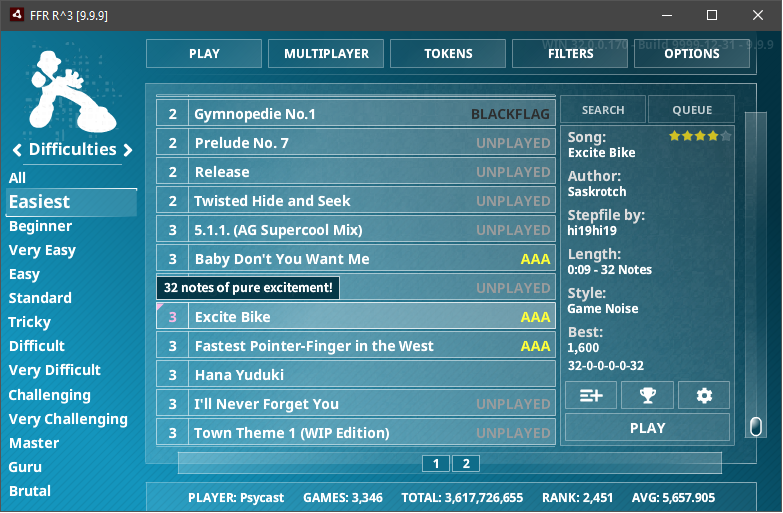
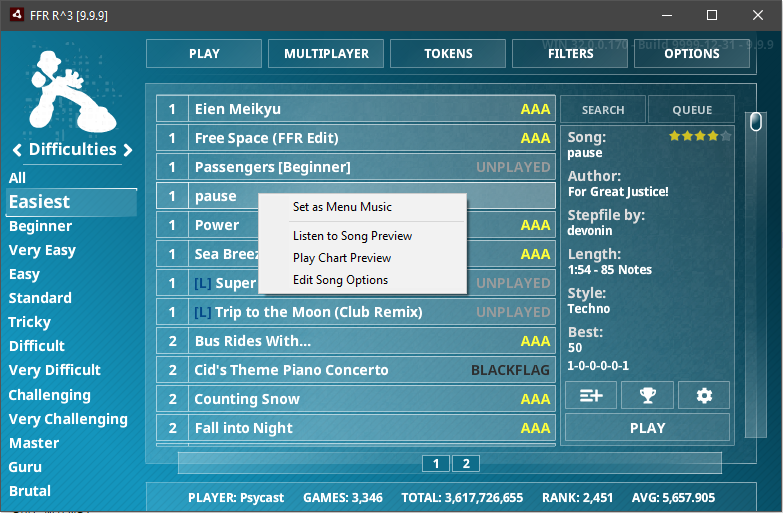
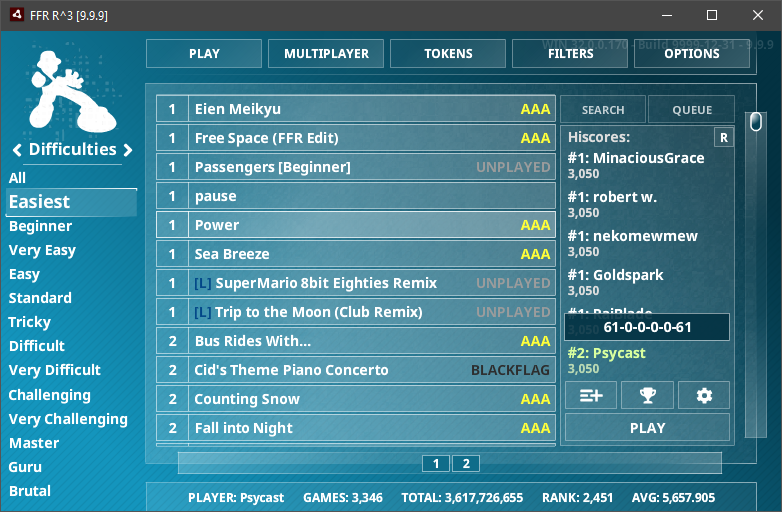
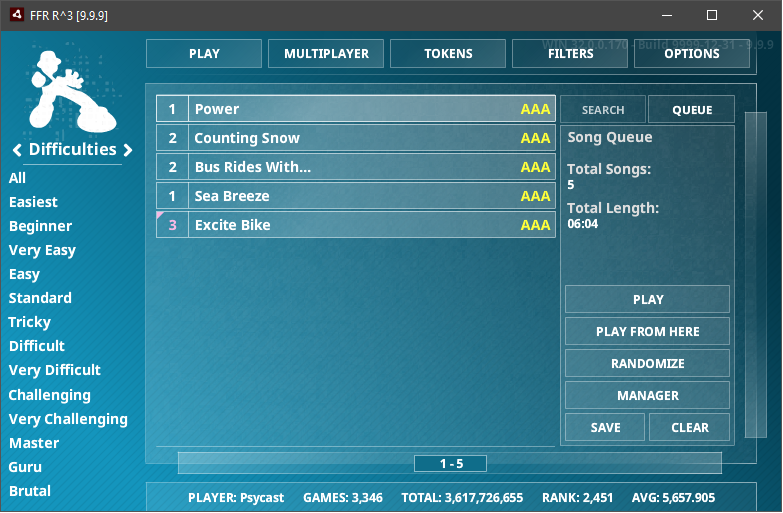
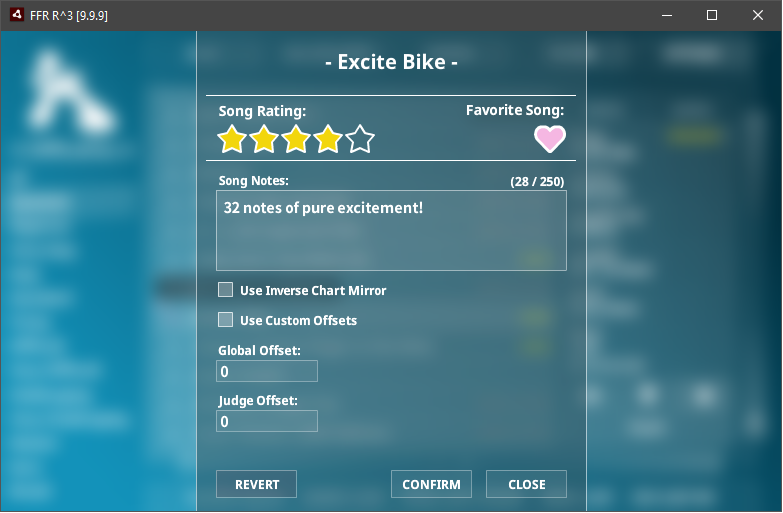
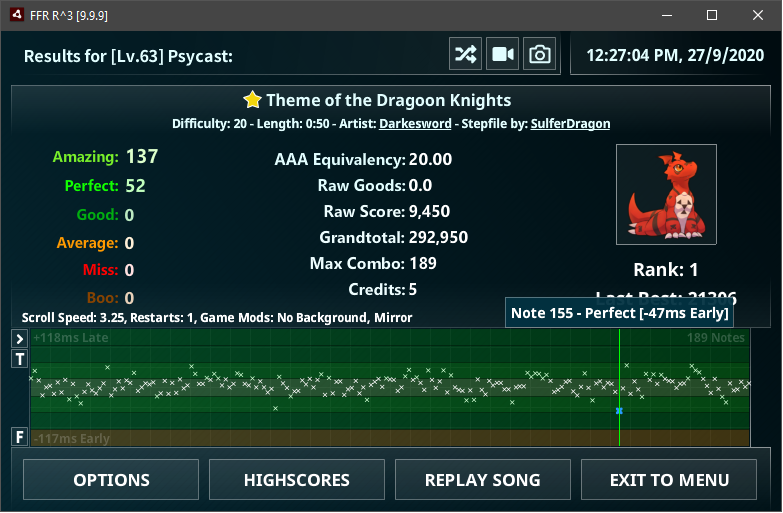
With 149 changed files, 8533 additions and 7921 deletions, this may be one of the largest engine releases we’ve done with a massive amount of work done by Velocity (@Psycast) going into refactoring major core components such as the Song Selection and Game Results screen.
This this release comes Favorite Songs, Purchasing Songs within the game, tracking of Full Combos even when it’s not the best score, better accuracy graphs, and a lot of bug fixes and improvements.
As always the download links for the release can be found in the left sidebar with the blue Download button or by clicking here, if you run into any issues, be sure to drop an issue over at our issue tracker.
So without farther ado, here’s the change list for rCubed 1.3.0 released:
Engine Loading:
Rewrite Noteskins to use Embedded Data instead of Network – Velocity (@Psycast)
Loading the noteskin SWF data from the server was previously used to provided easier ways for noteskins to be added without requiring a new engine build.
Since the inclusion of Custom Noteskins, no new noteskins have been added to the network noteskins for many years and just adds to the engine load time.
This rewrite embeds all current noteskin data into the game to remove network loading, optimizes how it’s loaded, and add documentation and general code cleanup to the overall class.
Reduce login loading time – Andrew WCY (@G-flat)
Cuts back the amount of extra reloading the game has to do when logging in or changing users as only 3 of the 5 game files actually change depending on the active user and reloading the others is a waste of time.
Add Reload Engine / User to global context menu – Velocity (@Psycast)
Adds a menu to the global context menu to reload engine and user data without closing the game.
Add Profile Change in context menu – Sploder12 (@Sploder12)
Allows the player to change the active logged in use from the global context without closing the game.
Song Selection – Velocity (@Psycast):
Song Selection was the first target of a massive refactor effort by Velocity, aiming to clean up years of technical debt and add full documentation to the source code.
In total, memory usage was reduced by about 30-40% and playlist rendering is about 20-25% faster on average due to the UI component rewrites detailed lower.
Beyond that, the menu also received a magnitude of features that have either hidden in context menus or have existed in older engines but not brought forward until now.
Menu State Saving:
- Fixed many inconsistencies with how the menu is saved when switching views, so now when returning from the results screen, everything is restored exactly as it was.
Song Item:
- The highlighted song item will now correctly update when a song item is moved or removed in response to filters or genre switching.
- The Song Info tab will also now accurately display the selected song at all times.
- Favorite Song: Displays the difficulty with a small pink triangle and pink difficulty text. This can also be filtered on.
- Song Notes: Displayed on the scroll list when hovering over a song item. This can be disabled in the Visual options screen.
- Full Combo*: Full Combos are now tracked separately from the current score, allowing you to see and track songs that have been FCed previously but not the current score.
- This is the lowest priority flag, so if the current score is a normal FC or better (eg. SDG), then it won’t display the FC*.
Song Item Context Menu – Andrew WCY (@G-flat):
- Add “Listen to Song Preview”: Plays the song while still on the menu.
- Add “Play Chart Preview”: Plays the the chart like the preview on the website with auto-play.
- Add “Remove from Queue”: When viewing the queue, allows removal of a song from the queue.
Song Info:
- Purchasable Songs can now be purchased directly in the game instead of opening the shop.
- Star Rating has been changed to display your personal rating instead of the global rating. It’s also smaller and should no longer overlap with longer song titles.
- Song length now includes note count when provided from the playlist.
- “Add to Queue”, “Highscores”, “Song options” now use Icon Buttons to reduce text clutter. These include hover text to still display what they are.
- Highscores will now display the PA count when hovering over a entry.
Per Song Options:
- Now have a dedicated menu button on the song info panel, which used to be accessible on the context menu.
- Favorite Song has been added.
- Song Ratings, and all features within panel now fully work with Alt Engine songs as well.
Other:
- The Icons used for switch Genre Type and the Menu Music Controls have been updated.
Gameplay:
Static Judge Animations – Velocity (@Psycast)
Removes the moving/flashing animations on the judgments during gameplay.
Additional Combo Colors – justin_ator (@Xyr00)
Several additional Combo Color options have been added, expanding on the previous colors for AAA, FC, and Normal.
These additional colors cover the remaining flags for score and can be enabled/disabled on a per flag basis:
- SDG
- Black Flag
- Average Flag
- Boo Flag
- Miss Flag
Fix Note Isolation Bounds – Velocity (@Psycast)
Prevent invalid isolation values from causing a soft-lock or crash.
Game Results – Velocity (@Psycast):
Game Results was the second target for refactoring and source code documentation.
The main goals were to expand the accuracy graph to provide much more detailed information, reduce the UI clutter by switching to new Box Icons, and and more strict validation to parts of the gameplay that were often handled in unsafe ways.
Star Rating:
- Will now display the full Song Options popup instead of just the star rating.
- Is now always displayed.
Combo Graph:
- Rewritten to use the new system.
Accuracy Graph:
- Rewritten to use the new system.
- Adds text to denote where Early and Late are on the graph.
- Adds text to display the full note count for the song in the top right of the graph.
- Adds hovering to view on a per note basis the exact timing results.
- Adds boos to the result graph.
- Adds a toggle to the right side of the graph to flip the axis.
- This was previously found in the Other tab on the settings panel.
- Adds a “Judge Offset” display to the right of the graph, which displays the estimated correct judge offset in frames for the settings panel, and milliseconds.
- This was previously displayed in a context menu on the game mods.
Highscore:
- Disable the “Highscores” button on Alt Engine songs as it would just crash the game.
Options:
- Disable Hotkey when in a textfield.
- Redraw options when resetting.
UI Components – Velocity (@Psycast):
- Box: Now uses one sprite instead of three and has optimized drawing. Reduces overall UI memory usage by around 40% due to it’s heavy use.
- BoxButton: Now extends Box.
- BoxText: Now extends Box.
- BoxText: Now extends Box.
- BoxCheck: A white dot has also been added to the center to make it more apparent it’s checked.
- ScrollPane: Optimized Redrawing. Around 20% faster when displaying large list.
Several Regressions from 1.2.4 – Velocity (@Psycast):
- Black background in song loading screens.
- Build info string shown in gameplay background.
- Game freezes when playing with custom noteskin without noteskin data.
- Game freezing at the start of song due to improper object pool filling creating 12,672 objects instead of 144.
- Fix receptor layer position.
Stay safe, don’t give up, and be kind to one another.
- Velocity and the FFR Development Crew.
Division 8 & New Division 7 Cutoff
In 2019, the 12th Official Tournament introduced a terrifying new skill bracket. Now these godly players are officially recognized on the Global Leaderboards with a cutoff of Lv.101. The next R^3 engine update will add the Division 8 title to the multiplayer lobby.
In addition, the cutoff for Division 7 has been lowered from Lv.95 to Lv.94. This more accurately reflects division placements for the upcoming 13th Official Tournament.
- PrawnSkunk & The Game Management Team
R^3 Air Edition v1.1.1 Release & April Fools’ Event
Well it’s been nearly 2 years since the last official engine update. This is primarily built off the OT edition release awhile ago with mostly touch-ups to existing features and a few small ones as well. Notable inclusions are:
- Token Panel: Replaces the underused Stats panel and allows easy access to viewing locked and unlocked tokens, and provides a direct link to the required song(s) needed to unlock the token.
- Song Options: Per song options for judge offset, music offset and mirror mod. Also comes with a small note field when you can leave notes to yourself about the song.
- Leaderboard Update: Clicking the userbar on the song selection screen allows you to update your skill rating and other stats directly from the game, no longer needing to visit the site to do so.
- [Add] Replace underused Stats panel with Tokens.
- [Add] Selector for Start-Up screen under “Other” on settings screen.
- [Add] Auto-loading of external replays from “replays” folder, sorted by engine.
- [Add] Search to Replay History, for both Recent and External Replays.
- [Add] Full Unicode support on most things.
- [Add] Leaderboard update button.
- [Add] Colorpicker to color fields on settings screen.
- [Add] VSync toggle in options.
- [Add] Basic Level Scripting functionality.
- [Change] Rebuild login to used saved session tokens instead of saving credentials.
- [Change] Improve Mouse Wheel logic for scrollpanes.
- [Change] Auto-save replay paths now use engine_id instead of engine_hash for file paths.
- [Change] Adding a song to queue using [Queue] and then [Play] will no longer add a duplicate.
- [Fix] String Filter compares.
- [Fix] Mirror in replays if user has it set, but not in replays.
- [Fix] Blank filters being exported, which could corrupt user settings.
- [Fix] Boo counts in FFRBIN replays.
- [Fix] Unlock tokens when acquired on results screen, no longer need to reload engine.
- [Fix] Add handling of multiple tokens in a single play to be unlocked and displayed.
- [Fix] Fix crash on edge-case in MP if a player leaves while another is still in-game.
- [Fix] Fix crash on missing entries on level_rank entries on rare cases.
- [Fix] Save search state for all cases.
- [Fix] Scrollbar saving position while changing genres.
- [Fix] Version compare logic.
For a limited time only, pass Megalovania [Special] on R^3 Air Edition v1.1.1 for a unique profile reward. You feel like you’re going to have a bad time.
Megalovania [Special]
Musician: Toby Fox
Step Artist: DarkZtar
Difficulty: 0
Song Length: 2:38
*Whimper Wall*
Musician: Nez
Step Artist: Velocity
Difficulty: 120
Song Length: 1:06
Note: If there is an issue updating, or the game not starting after updating, re-download the game from the front page. This update does NOT apply to the in-browser Flash engine, which remains at v0.0.8.
- Velocity
Songs of the Week 10/1/19
They’re back! That’s right, songs of the week have made their return. For the time being, we will be bringing you five new files per week. Believe it or not even after the Official Tournament we still have a fair bit left in the queue for you. We’ve also started judgements on the new batch as well, so you can expect lots of great content to be coming your way!
Here are your songs for this week:
Lavender Town [Fairytale Remix]
Musician: Rachel Macwhirter
Step Artist: XelNya
Difficulty: 4
Song Length: 1:21
If Trees Could Speak
Musician: The Flashbulb
Step Artist: Ghost_Medley
Difficulty: 45
Song Length: 1:46
Human World – Wandering Soul
Musician: DanJohansen
Step Artist: M0nkeyz
Difficulty: 63
Song Length: 1:46
L
Musician: Ice
Step Artist: DarkZtar
Difficulty: 73
Song Length: 2:06
Miserable Bastard
Musician: Terminal 11
Step Artist: Shxfted
Difficulty: 87
Song Length: 1:33
Also, it’s October 1st. Do you know what that means? Spoopy season has started! Keep an eye out for some Halloween themed events soon. For now though, if you’re looking for something to do other than play the game check out the werewolf game they’re still looking for a few more signups!
Enjoy!
- psychoangel691 & The Game Management Team
A New Batch and Judge Applications? What!?
That’s right! A brand new regular batch is now open for the September/October period. I know many of you have been waiting for this for a while, now your time has come to bestow your masterpieces upon us. Check out the thread for the details on where to submit and all that good stuff. Finally doing away with the emails! I’m super excited! I also can’t wait to see what some of the newer people to FFR bring to the table.
Now on to another bit of news, we’re accepting judge applications! Have you ever wanted to join the team that reviews the content you get to play in-game? This is your chance! You will have to fill out a questionnaire to be considered, find all those details here.
That’s it for now. Keep your eyes out for more to come!
October 5-Day Release: Day 1
Welcome back to a new Song Release event! We will enjoy the start of October with 5 songs, one song every day. The difficulty progresses every day.
Today we start with the easiest of the 5 songs, an electronic track by Marshmello from the Monstercat label.
Alone
Musician: Marshmello
Step Artist: VisD
Song Genre: Dance 2
Style: Electronic
Difficulty: 54
Song Length: 1:44
Also, feel free to leave comments in this event’s release thread.
- The Game Management Team
Bi-Weekly Songs of the Week (Apr. 1, 2018)
Happy Easter, Passover, and April Fools! That means we get songs with awesome titles. Or maybe we could be kidding about that 
Feel free to leave a comment on this release in this thread.
Jews 1 Oppressors 0
Musician: Jake Kaufman
Step Artist: hi19hi19
Song Genre: Misc
Style: Novelty
Difficulty: 58
Song Length: 3:29
Smoke Weed Everyday
Musician: Rasmus Hedegaard
Step Artist: Xiz
Song Genre: Dance
Style: Hip Hop Remix
Difficulty: 34
Song Length: 1:52
- The Game Management Team