





Spontaneous Contest #2
Another Spontaneous FFR Contest Tonight at 8pm! That is Central Time!!
PREPARE YOURSELF!! Get your cameras ready! NOTIFY FAMILY, FRIENDS, TOTAL STRANGERS!
Ok.. HERE WE GO!
Tonight is another photo contest. You will need 2 things for this contest to be a success
1 piece of paper that says “FFR IS DA BOMB YO!”
2 Parents holding that piece of paper while posing for the camera.
If you are in the photo, it disqualifies your entry.
First person to post a link in the forums or respond to this story with a link wins
If after 1 hour nobody has made a submission, contest closes.
Good luck! $25 dollar prize tonight paid via paypal!! GO!
CONTEST OVER!! TOKZIC IS THE WINNER!! *********************
The good news is that I will post all of your parents on the homepage.  Thanks for playing. Tokzic PM me your paypal address!
Need People in the Chat for Testing
We are testing the new FFR video chat and need people in there to test it under heavy load. Click
HERE to enter the beta. Use your FFR username and pass for entry.
Spontaneous Content!
1 Hour Contest to Start at 5pm Central Time (6pm Eastern)!!!! Tell Your Friends, Family, Pets and Pets Friends!
Contest? Yes, contest. The details will be posted in this news story.
Cheers,
FFR Staff
***********************
CONTEST STARTS
***********************
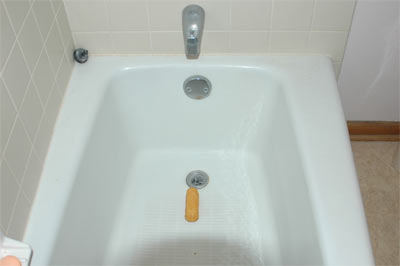
First person to post an unaltered photo taken today of a twinkie in their bathtub wins $50 via paypal! It’s kind of a spontaneous day! If nobody posts this picture within 1 hour in the forums or provides a link to this picture in the article response, the contest will end without winner.
Good Luck!!!!! GO!!! Winner’s photo will be shown on the homepage!
** 30 MINUTES LEFT!! HURRY ** 5:30pm
CONTEST CLOSED!! WE HAVE A WINNER! siikduke! The winning picture will be posted in this news story shortly. Siikduke, please PM me your paypal address.
How to be a DJ on FFR Radio
Ok, so now that you know the FFR Radio exists, you are probably wondering how
you broadcast and become a DJ. We will get to that in just a second but before
we do let me make a few things very clear.
DO NOT refer to your broadcast as anything else other than FFR Radio
DO NOT use excessive swearing or bad language
DO NOT broadcast audio with intent on profiting or asking for money
DO NOT broadcast in your underwear
DO NOT feed the animals
Alright, now that the simple rules are out of the way, lets get down to
business. The first thing you need to do is grab yourself a copy of the latest
Winamp 5 (or later) and download the best version possible without having to pay
for it. It is usually available
ON THIS PAGE but the URL may have changed. Basically you are downloading the
Bundle version not the Pro, Full or Lite version. Go ahead and install this
Winamp with the default options and then move on to the next step.
Winamp is great but we will also need to connect and broadcast what we are
playing. This is where oddcast comes in. You will need to head over to
oddsock.org and grab yourself a copy of the
Oddcast V3 plugin for Winamp
3.1.9 or higher once you have downloaded this, install it and do you best to
follow the directions during install. It may ask you to go to certain websites
and install certain codecs, just do whatever it says and you will be doing fine.
Now that you have installed everything you need. It is time to configure it.
I promise that configuring won’t take long as long as you read the directions
that I have written for you.
1. Start Winamp
2. Within Winamp go to Options –> Preferences –> Plugins –> DSP/EFFECTS
3. Choose the Oddcast Plugin from the list and click close on the Winamp
Preferences window
4. You should now have both Winamp and the OddcastV3 window open. If so,
click "Add Encoder" on the OddcastV3 window
5. You will see it add an entry into the OddcastV3 window. Now right click on
that entry and choose "Configure"
6. We will cover "Basic Settings" tab here
Bitrate: 128
Samplerate: 44100
Channels: 2 (checkmark Joint Stereo)
Encoder Type: MP3 Lame (others like AAC have higher quality
but you risk incompatibilities when users connect)
Server Type: Icecast2
Server IP: flashflashrevolution.com
Server Port: 8000
Encoder Password: Commodore1
Mount Point: /music1
Reconnect Seconds: 10
7. Click OK
8. Simply select the Encoder from the list and click "Connect" in the Oddcast
window
9. Enjoy streaming the music to whoever you want.
Some important notes about the configuration. Commodore1 /music1 is for
Station2, Commodore2 /music2 is for station3.. etc..etc..
The URL for each station is
http://www.flashflashrevolution.com:8000/music1.m3u or music2.m3u etc..etc.
The URL for people with windows media player would be
http://www.flashflashrevolution.com/ffrradio1.asx for station2..
ffrradio2.asx for station3 etc..etc.
There are other options available within oddcast for using your mic etc. You
will have to read up on that on your own time. This guide is meant to get you
started on the basics.
Enjoy!
Cheers,
Synthlight
Btw.. You can see what each station is doing here: FFR Radio
License and Registration Please
We have shut down registration for an hour or so until we clear up the permissions issue with new users. Things are moving quick so this shouldn’t take long.
Cheers,
Synthlight
LD EDIT: I’ve resynced the last 2,000 accounts to register, users who didn’t see any of the site but the header or footer should now be able to see all parts of the site. If you are still having problems, please comment here, if you can’t comment here, please IM lightdarkness42 (AIM). Registration will be up in a few. -LD
SYNTHLIGHT EDIT: Registration is now fully working again. As LD stated, the accounts from the last couple of days have been sync’d up and new users from this point out shouldn’t have any problems.
846,866 Members and rising.
CHATTTTTT!!
The beta of the new FFR Video Chat is up and live. Click
HERE to join. Use your FFR username and pass for entry.
FFR Radio + members = Chaos
FFR Radio goes public.. Wha? Huh? What does that mean? This means we will be allowing any member with the Winamp + oddcast plugin (FREE!) to broadcast through any of the 3 public FFR stations to any audience. Your connection to the radio server will then be relayed on FFR’s bandwidth to the listeners on the specific FFR channel that you connect to. If you ever dreamed of broadcasting to an audience or have friends that you would like to broadcast your signal to, FFR radio is the perfect tool. If you are a band or group looking for exposure, again, this is your chance.
I will post the details later in the forum but basically you will need to go and get the latest and greatest free version of winamp and then head on over to oddsock and grab yourself the oddcast plugin for winamp. After this you configure the plugin to login with the correct pass, mount point and just like that, you are broadcasting. Again, I will release the login / details on an official page in the FFR Forums sometime tonight or tomorrow. You will NOT need to announce a time or date in advance. When you broadcast your show is up to you.
Here is a breakdown of the stations:
0. Auto Playlist. Not accessible. Station 1 defaults to this station when there is no DJ on Station 1
1. Main Station. Plays auto-dj or accepts a connection from regular FFR DJ’s. Login/Pass is private
2. Member Station. Any member can broadcast
3. Member Station. Any member can broadcast
4. Member Station. Any member can broadcast
FFR Radio will be among the many new additions and changes you will find at FFR here this week. We are planning another new section for tonight or possibly tomorrow depending on how development goes. Stay tuned.
Cheers,
Synthlight
Embed Media & SimFiles Section & Bears, Oh My!
3 Quick notes for you guys today.
We are now allowing you embed media directly into the forum. This should live things up a bit and allow you to show proof of your abilities if you wish. You can see the example How to Embed Video and Audio Media on the Forum
Secondly, we have fixed the small issue on the SimFile section and have raised the upload limit. We now have nearly 3000 simfiles for you to browse and download.
Last but not least, many of you have been asking how you can help FFR. I have a very simple answer for you. Link us. The more links that are posted in forums and blogs, the more traffic we will get. We will be creating a “links of the week” block that will show the sites we find that have linked to us. This is by far the best way anyone can help FFR.
Cheers,
Synthlight
P.S. 2 new features will be added to the website this weekend. Stay tuned for the uploads.
Server World
I spent last night wandering the streets of downtown Chicago with a 30 pound 1U Server. I ended up walking almost 3 city blocks with this thing before I collapsed in the lobby of the Chicago Board of Trade, my final destination.
Long story short, I dragged the server to the elevator, went up to the 11th floor and had the machine installed at the datacenter. This machine will be our new FFR home and should make a fine home for atleast the next 3 years (that is when my lease is up on it!). As of now I have copied all 20GB+ of FFR over to the new server but I will be referencing the old database for the next 12 hours. At some point after that, I will move the database local and it will be screaming fast once again.
This has been a crazy month if you only count all the financing paperwork I had to go through. Throw FFR server moves and upgrades and you raise that difficulty by 5x. Throw in working on 3rd style and you raise it another 5x.
P.S. If you want to know if you are on the old or new server, just drop into a dos prompt and type ping www.flashflashrevolution.com if it starts with a 209, you are on the old. If it starts with 67 you are on the new.
Cheers,
Synthlight