
Go Back   Flash Flash Revolution > Flash Flash Revolution > Brag Board
Register FAQ Community Calendar Today's Posts Search


Thread Tools Display Modes
Prev Previous Post   Next Post Next
Old 08-21-2007, 01:23 PM   #1
Dazzled
FFR Player
 
Join Date: Jan 2006
Posts: 1,399
Default How to show the background of the file in the results screen.
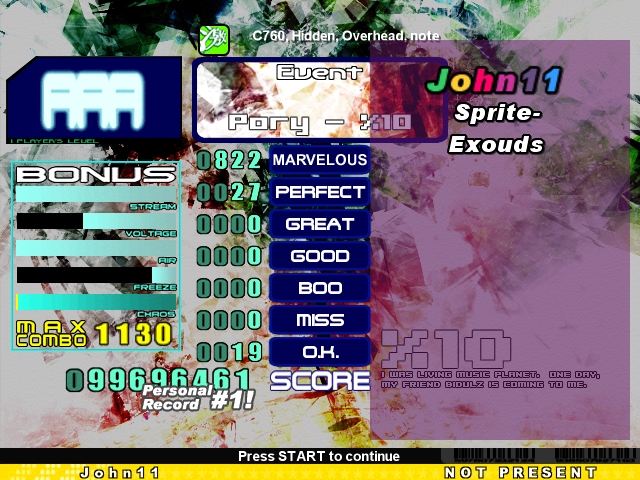
This is "stolen" from ODI, topic made by Yesssss. Credit goes to him.

But, as the Stepmania forums there are hidden tot nonregged users, we could as well just make a topic here, as I've seen multiple people ask for this before. And some people seem to have trouble registering...

Quote:
Originally Posted by Yesssss
So we don't have to keep referencing to the one scoreboard topic, I'll just put it here, since it's really where it should go. Props to John11 for all of it.


Here's an example screenshot:


Quote:
Originally Posted by john11
Here's what I did for SM3.95

You might want to keep a backup copy of your default theme incase I left out a step or something.

go to [Stepmania Root]\Themes\Default\BGAnimations

Delete: ScreenEvaluationStage background.redir
Create: a folder ScreenEvaluationStage background

inside ScreenEvaluationStage
Create: BGAnimation.ini

in BGAnimation.ini
Enter:
Code:
[BGAnimation] 

[Layer1]
File=songbackground
Type=0
Command=diffuse,1,1,1,0.75;scaletocover,0,0,640,480;

now open the metrics.ini
search for [ScreenEvaluationStage]
somewhere in that section add:
Code:
HeaderY=999 
StyleIconY=999 
TimerY=999
to remove the header

next in the same section change:
Code:
DifficultyIconP1X=214 
DifficultyIconP1Y=40 
PlayerOptionsP1X=250 
PlayerOptionsP1Y=40
to move the difficulty and modifiers above the banner

Hopefully I'm not forgetting something. Someone let me know if that works.

Last edited by GuidoHunter; 08-22-2007 at 12:51 AM..
Dazzled is offline   Reply With Quote


Currently Active Users Viewing This Thread: 1 (0 members and 1 guests)
 

Posting Rules
You may not post new threads
You may not post replies
You may not post attachments
You may not edit your posts

BB code is On
Smilies are On
[IMG] code is On
HTML code is Off

Forum Jump


All times are GMT -5. The time now is 05:51 PM.


Powered by vBulletin® Version 3.8.1
Copyright ©2000 - 2026, Jelsoft Enterprises Ltd.
Copyright FlashFlashRevolution