Photoshop Is Hard.

Collapse
X
 
  • Time
  • Show
Clear All
new posts
  • midnghtraver
    Icarus Moth
    FFR Music Producer
    • Jan 2006
    • 2064

    #46
    Re: Photoshop Is Hard.

    So I know what you are going to say about this one, "Its hard to read."

    So i'm asking, how could I keep the feeling that the white on white provides, and make it easier to read at the same time?


    EDIT: Might as well throw this one up too.

    Last edited by midnghtraver; 05-30-2011, 01:07 AM.

    Comment

    • Nullifidian
      ¯\_(ツ)_/¯
      FFR Simfile Author
      • Sep 2007
      • 1837

      #47
      Re: Photoshop Is Hard.

      Originally posted by midnghtraver
      So I know what you are going to say about this one, "Its hard to read."

      So i'm asking, how could I keep the feeling that the white on white provides, and make it easier to read at the same time?


      EDIT: Might as well throw this one up too.
      http://i973.photobucket.com/albums/a...5_897865_n.jpg
      1st one detracts a lot from the readability. One factor is probably because of the blur on the font, but a bigger issue is that it blends in too much with the white of the background. The colors you chose aren't really appealing either imo. I can see the idea but the execution needs work. Not completely sure if you should try to save it though, I think you're better off working on something else.
      2nd one is neat but the cutout could use better rendering. Look into using the pen tool for cutting out.
      The for him right shoulder in front of the 2 L's and behind the I looks weird btw. Either put that part behind the letters or in front of the letters. Behind is probably better because then you can read the I and L better. Make sure to keep the tie in front because that looks neat and it creates depth.
      To render out special effects you need to mess with selections of the RGB layers and paste the selected parts in. This way you preserve transparency (somewhat faking it but it works most of the time).
      You could try making some of your own special effects with brushes and layer styles. Overlay and screen layers work really good for making flashy effects.
      Last edited by Nullifidian; 05-30-2011, 02:10 AM.

      Comment

      • midnghtraver
        Icarus Moth
        FFR Music Producer
        • Jan 2006
        • 2064

        #48
        Re: Photoshop Is Hard.

        The I should def. not be in front of his arm i don't know what I was thinking there.

        Didn't really fix much of what you said, but it looks better for sure.
        Last edited by midnghtraver; 05-30-2011, 02:59 AM.

        Comment

        • midnghtraver
          Icarus Moth
          FFR Music Producer
          • Jan 2006
          • 2064

          #49
          Re: Photoshop Is Hard.


          I put the A in front because I want the impression that the dude is leaning in between the space between the L and the A. It gives it more 3dness.

          Comment

          • Spenner
            Forum User
            • Nov 2006
            • 2403

            #50
            Re: Photoshop Is Hard.

            Interesting. The first one won't work with the amount of softness to it, and the lack of coverage around the text. You need to have contrast between those colour swirls > text to make the text readable, right now it's too subtle, and not hard enough.

            Number two is pretty cool, I like the idea of it-- what version of Photoshop are you using? If you have access to the Refine Edge/Mask Edge tool, google it, look up a tutorial, play with it. Crop jobs otherwise have basically the same default look-- either they're hard pixelated, straight geometric with anti-alias, or they have a blurry glow from being feathered. The feathered look to the whole edge on the image you're using kinda throws me off near the top, and down below I can see you used a higher radius of feathering and erased it a few times due to the transparency which is sometimes a neat effect. However near the top and for some parts on his arms over the text it's a bit weak, I think it needs sharpness.

            So yes, try to look into it, it'll give images you crop a cleaner less generic look. Keep it up

            EDIT: As well, I think it would add to the image to have a bunch more "stuff" coming off those places where it's just a plain curve near the edges, doesn't match the look you've created on the right which makes it seem like the whole thing's melting away.

            Comment

            • midnghtraver
              Icarus Moth
              FFR Music Producer
              • Jan 2006
              • 2064

              #51
              Re: Photoshop Is Hard.

              Yea, the thing about the guy is I wanted to look like he was painted on, so I didn't want hard edges, but I went too far with the arm and i'm not sure if i'm going to be able to fix it.

              Comment

              • Mythix
                FFR Veteran
                • Oct 2006
                • 1045

                #52
                Re: Photoshop Is Hard.

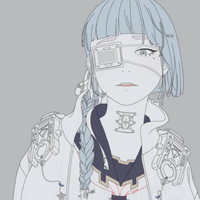
                On the last one, outer glow just doesn't help out.. Get some light brushes and draw uneven edges around it to make it glow and then use glow on that layer instead and she'll get a nice toneout imho

                Comment

                • Renevatia
                  FFR Veteran
                  • Feb 2006
                  • 555

                  #53
                  Re: Photoshop Is Hard.

                  Originally posted by midnghtraver


                  It doesn't look that legit, but I tried. it started as a drawing i did in pencil, then took a picture of with my phone. Ended up throwing it on a fence.
                  I like the idea.

                  The skew seems okay, try to use a different layering method? and consider that there are gaps in the planks so kinda show how paint would show with those gaps, that alone should make it a lot more legit.
                  Reminder for self to make new sig.

                  Comment

                  • Mythix
                    FFR Veteran
                    • Oct 2006
                    • 1045

                    #54
                    Re: Photoshop Is Hard.

                    Originally posted by Renevatia
                    I like the idea.

                    The skew seems okay, try to use a different layering method? and consider that there are gaps in the planks so kinda show how paint would show with those gaps, that alone should make it a lot more legit.
                    My first thought was that it's transparent... Grafitti isn't transparent =p


                    Second though was... The grafitti is casting shadow on the wall? What made you want the piece to cast shadow as if it's hovering 1 feet above it xD

                    Comment

                    • midnghtraver
                      Icarus Moth
                      FFR Music Producer
                      • Jan 2006
                      • 2064

                      #55
                      Re: Photoshop Is Hard.

                      Originally posted by Mythix

                      Second though was... The grafitti is casting shadow on the wall? What made you want the piece to cast shadow as if it's hovering 1 feet above it xD
                      No its not O.o

                      Comment

                      • who_cares973
                        FFR Player
                        • Aug 2006
                        • 15407

                        #56
                        Re: Photoshop Is Hard.

                        Originally posted by Mythix
                        Second though was... The grafitti is casting shadow on the wall? What made you want the piece to cast shadow as if it's hovering 1 feet above it xD
                        thats the shadow of the graffiti itself lol.

                        Comment

                        • midnghtraver
                          Icarus Moth
                          FFR Music Producer
                          • Jan 2006
                          • 2064

                          #57
                          Re: Photoshop Is Hard.

                          So I tried to make a logo, I discovered brush's and real textures.

                          I couldn't figure out where to put the Milla though. Where do you think I should put it?


                          Should it go here?

                          Last edited by midnghtraver; 06-13-2011, 09:50 PM.

                          Comment

                          • midnghtraver
                            Icarus Moth
                            FFR Music Producer
                            • Jan 2006
                            • 2064

                            #58
                            Re: Photoshop Is Hard.

                            I know this is a bump. But it didn't deserve its own thread and it fits with the rest of this.

                            Comment

                            • Spenner
                              Forum User
                              • Nov 2006
                              • 2403

                              #59
                              Re: Photoshop Is Hard.

                              Heh, that's cool I like it. Looks like it would be plastered on a slushi drink

                              Comment

                              • supermousie
                                FFR Player
                                • Feb 2006
                                • 1074

                                #60
                                Re: Photoshop Is Hard.

                                The 'M' is a little more difficult to read than the other letters. Highlight the M and play around with levels -I'm assuming you're using Photoshop- which is Ctrl+L.

                                Overall, it's a big improvement over the first image you put up.
                                Last edited by supermousie; 07-7-2011, 01:26 AM.
                                Originally posted by aperson
                                yolo

                                Comment

                                Working...