lol, cia rave is hard, on a good day i average 30 goods. any tips, like what should i concentrate on more, the arrows, or were the arrows are to be hit? i turn sound off already. I also have problems with other hard songs, like delirium and thinking.
screencut anymore i have learned makes it worse, i'm already above the combo. keytaps... is that just a mentle thing that makes you better? volume, i have found turning it off makes me better, how closely, can you give an aproxomite distance, i measured once with a peice of paper and it was about a foot away and i had good runs. whenever i start playing ffr after playing sm for a long time i usually do better, but then i get used to the arrows on ffr and go back to normal. CIA is SH!T.
p.s. 100 post yay
edit: should i be watching the blue arrows going up, or the brown arrows that stay in place?
CIA is an easy song, you just have to feel the beat or else your run will suck. I've fluctuated from 15+ goods to 2 goods in consecutive runs. I find that beatboxing with the song my first run (my score is always worse this run because I'm not focusing completely on the arrows) and then without the next run helps out. If I have fun with it I do good.
As for keytaps, just make sure they're with the music, or constant if you don't have music on. The first 16 arrows are very helpful because you get a good feel for the beat right before the streams.
P.S. Rhythms that I beatbox- First 16 arrows then the 16 bars after=straight bass (um with throat)
Next 16 bars- bass with high hat (ss with tongue; standard "partyboy" um tss um tss)
8th note part- um tss tss um tss tss um tss 3 times, straight sixteenths with bass 4th bar, repeat once then go with the 1e+2+3e+4+1e+2+3e+a4e+a until that ends
Screw around for rest of song. Generally I miss one here but I don;t care 'cause I'm having fun
Next run=pwnage
Hit Print Scrn beside the F12 key, paste into Paint, cut out desktop and whatnot, save picture, go to imageshack.us, click browse, find/select the picture, check the resize box. 640x480 (for message boards), check the remove size/resolution bar from thumbnail button, hit host, When it comes up, select the bar "direct link to your image" button, copy, paste and put [.IMG][/IMG] around the url (minus the period). Voila, you have a screenshot.




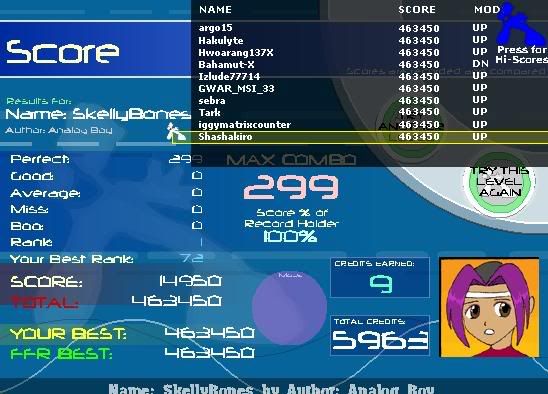


 2 goods.





Comment