How to change Stepmania's arrow speed mods

Collapse
This is a sticky topic.
X
X
 
  • Time
  • Show
Clear All
new posts
  • super-smashman
    FFR Player
    • Nov 2004
    • 2638

    #31
    You don't want to change the BPM of a song or it will be HORRIBLY off sync. Unless you want mean you want to change one of your own sims because it is off.

    You do this in the Edit Songs section inside StepMania. Load the song you want and at the very first note it should tell you the BPM. One of the F keys (not sure which) will make the BPM increase while another will make it decrease. Hit ctrl + P to play the song to see if you got it right.


    Comment

    • Mindfields
      Banned
      • Dec 2004
      • 1566

      #32
      Yeah, I figured that part out, but of course then there's the resyncing, which is painfully easy, yet really long and it's hard to remember where all the arrows go.

      Comment

      • Riktor
        FFR Player
        • Sep 2004
        • 27

        #33
        You know, I've noticed that when you add custom speed mods to the game, it messes up C400. Like when you first install the game and play at C400 the arrows do not actually scroll at C400 C300 scrolls faster than 400 does by default. but when you add a custom mod like 2.5 or C500 it makes C400 actually scroll at 400 BPM.

        Has anyone else realized this as well?

        Comment

        • Novacaine
          Banned
          • Apr 2004
          • 282

          #34
          Have a question a little off topic.

          I once downloaded a song called Bag really really slow mix.
          It said he used 192nd notes

          Do u kno how to change it so I can get 192nd notes?

          Comment

          • Riktor
            FFR Player
            • Sep 2004
            • 27

            #35
            The only way to do such a thing right now, would be to make a custom build of Stepmania. If someone could program the game to recgonize 192nd notes it's all good.

            It was probably meant to be 192BPM

            Comment

            • Ryanistehleet
              FFR Player
              • Jul 2005
              • 75

              #36
              Does anyone here know why the hell I keep getting this

              Theme metric 'OptionNames : C500' could not be found in 'Themes/default/metrics.ini' or 'Themes/default/metrics.ini'.

              as an error? I added everything correctly, correct syntax and all. And nothing worked.

              yay

              Comment

              • super-smashman
                FFR Player
                • Nov 2004
                • 2638

                #37
                Go back a page.

                Comment

                • Ryanistehleet
                  FFR Player
                  • Jul 2005
                  • 75

                  #38
                  Well I put the speed mods in the english.ini, and saved it along with the speed mods with the default folder, and it still won't work.

                  yay

                  Comment

                  • super-smashman
                    FFR Player
                    • Nov 2004
                    • 2638

                    #39
                    Copy the codes here, I bet you made a small error.

                    Comment

                    • Ryanistehleet
                      FFR Player
                      • Jul 2005
                      • 75

                      #40
                      Works now. Thanks.

                      yay

                      Comment

                      • sandj
                        FFR Player
                        • Oct 2005
                        • 1

                        #41
                        I was wondering, is it possible to change the actual default speed? I changed SpeedDefault to 2x, but it dosen't seem to be working. So then I decided to switch the 1x and 2x actual mods around, and found out that it automatically selects the one that has 1x mod, and not the name.

                        Anyone have a solution to this?

                        Comment

                        • Snapps
                          NO DOUBT GET LOUD
                          FFR Simfile Author
                          • Sep 2003
                          • 5650

                          #42
                          For the people who accidentally get rid of their metric speeds and etc, here is a full list of speed mods plus english:

                          [ScreenOptionsMaster]
                          # Player options
                          Speed=28
                          SpeedDefault=mod,1x
                          Speed,1=mod,1x;name,x1
                          Speed,2=mod,1.5x;name,x1.5
                          Speed,3=mod,2x;name,x2
                          Speed,4=mod,2.5x;name,x2.5
                          Speed,5=mod,3x;name,x3
                          Speed,6=mod,3.5x;name,x3.5
                          Speed,7=mod,4x;name,x4
                          Speed,8=mod,4.5x;name,x4.5
                          Speed,9=mod,5x;name,x5
                          Speed,10=mod,5.5x;name,x5.5
                          Speed,11=mod,6x;name,x6
                          Speed,12=mod,6.5x;name,x6.5
                          Speed,13=mod,7x;name,x7
                          Speed,14=mod,7.5x;name,x7.5
                          Speed,15=mod,8x;name,x8
                          Speed,16=mod,8.5x;name,x8.5
                          Speed,17=mod,9x;name,x9
                          Speed,18=mod,9.5x;name,x9.5
                          Speed,19=mod,10x;name,x10
                          Speed,20=mod,C600;name,C600
                          Speed,21=mod,C650;name,C650
                          Speed,22=mod,C700;name,C700
                          Speed,23=mod,C750;name,C750
                          Speed,24=mod,C800;name,C800
                          Speed,25=mod,C850;name,C850
                          Speed,26=mod,C900;name,C900
                          Speed,27=mod,C950;name,C950
                          Speed,28=mod,C1000;name,C1000
                          x1=x1
                          x1.5=x1.5
                          x2=x2
                          x2.5=x2.5
                          x3=x3
                          x3.5=x3.5
                          x4=x4
                          x4.5=x4.5
                          x5=x5
                          x5.5=x5.5
                          x6=x6
                          x6.5=x6.5
                          x7=x7
                          x7.5=x7.5
                          x8=x8
                          x8.5=x8.5
                          x9=x9
                          x9.5=x9.5
                          x10=x10
                          C600=C600
                          C650=C650
                          C700=C700
                          C750=C750
                          C800=C800
                          C850=C850
                          C900=C900
                          C950=C950
                          C1000=C1000
                          Flat=FLAT
                          Remember to copy paste over the existing ones so that this is now there and the other isn't.

                          Comment

                          • spel_werdzrite
                            FFR Player
                            • Dec 2005
                            • 7

                            #43
                            YAY! I PWN!. Read the readme. This is mainly a nice little add-on to the mods. It seperates all the mods to be chosen individually (i.e. Boost and Wave).
                            It also has percents (i.e. 200% Expand, 300% Boost, and/or 1500% Dizzy).
                            It also has speed mods x1.25, x1.5, x1.75, etc. all the way x10!
                            Plus, CMods from 50 to 1000 going by 50's.
                            I added 50% stealth which I call white. Also, 75% stealth (transparent).
                            One more thing, I put in 50% Flip. It's pretty much puts all the arrows in one colomn like in DDR Extreme USA Misiion Mode.
                            Try this: Converge, Stealth, 200% Brake. It's pretty much a new mod! I call it Bounce.
                            Check it out and enjoy!

                            Comment

                            • Novacaine
                              Banned
                              • Apr 2004
                              • 282

                              #44
                              Re: How to change Stepmania's arrow speed mods

                              every time I try to make mods whenever I go into use a speedmod on a song, it stops it, closes it out and says something like, cant find speed, col 4


                              does this happen to any1 else?

                              and what am I doing wrong?

                              Comment

                              • monkey_henry
                                FFR Player
                                • Jul 2005
                                • 166

                                #45
                                Re: How to change Stepmania's arrow speed mods

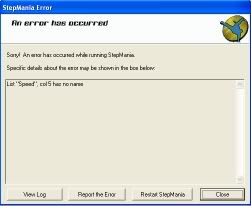
                                i think i hit a problem. I try to access the options screen and this shows up.

                                and here's my lists:
                                [ScreenOptionsMaster]
                                # Player options
                                Speed=28
                                SpeedDefault=mod,1x
                                Speed,1=mod,1x;name,x1
                                Speed,2=mod,1.5x;name,x1.5
                                Speed,3=mod,2x;name,x2
                                Speed,4=mod,2.5x;name,x2.5
                                Speed,5=mod,3x;name,x3
                                Speed,6=mod,3.5x;name=x3.5
                                Speed,7=mod,4x;name,x4
                                Speed,8=mod,4.5x;name,x4.5
                                Speed,9=mod,5x;name,x5
                                Speed,10=mod,5.5x;name,x5.5
                                Speed,11=mod,6x;name,x6
                                Speed,12=mod,6.5x;name,x6.5
                                Speed,13=mod,7x;name,x7
                                Speed,14=mod,7.5x;name,x7.5
                                Speed,15=mod,8x;name,x8
                                Speed,16=mod,C200;name,C200
                                Speed,17=mod,C250;name,C250
                                Speed,18=mod,C300;name,C300
                                Speed,19=mod,C350;name,C350
                                Speed,20=mod,C400;name,C400
                                Speed,21=mod,C450;name,C450
                                Speed,22=mod,C500;name,C500
                                Speed,23=mod,C550;name,C550
                                Speed,24=mod,C600;name,C600
                                Speed,25=mod,C650;name,C650
                                Speed,26=mod,C700;name,C700
                                Speed,27=mod,C750;name,C750
                                Speed,28=mod,C800;name,C800
                                x1=x1
                                x1.5=x1.5
                                x2=x2
                                x2.5=x2.5
                                x3=x3
                                x3.5=x3.5
                                x4=x4
                                x4.5=x4.5
                                x5=x5
                                x5.5=x5.5
                                x6=x6
                                x6.5=x6.5
                                x7=x7
                                x7.5=x7.5
                                x8=x8
                                C200=C200
                                C250=C250
                                C300=C300
                                C350=C350
                                C400=C400
                                C450=C450
                                C500=C500
                                C550=C550
                                C600=C600
                                C650=C650
                                C700=C700
                                C750=C750
                                C800=C800
                                Flat=FLAT
                                Can someone help plz?

                                Comment

                                Working...