Aftereffects trial

Collapse
X
 
  • Time
  • Show
Clear All
new posts
  • Renevatia
    FFR Veteran
    • Feb 2006
    • 555

    #1

    Aftereffects trial


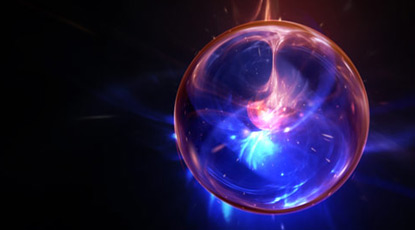
    really really really time consuming, kinda started yesterday so yeah no idea where the control is and following tutorial was a pain, took like 2.5hrs of work 1hr headdesking.

    The tutorial it self was around 45min, and not knowing where most controls are does not help, at all. The quality turned out to be crap just cause I didn't (couldn't) mess with the billions of options as well as the guy in the tutorial could.

    Couldn't gif render because of some error, will look into that when i need gifs.
    Reminder for self to make new sig.
  • Izzy
    Snek
    FFR Simfile Author
    • Jan 2003
    • 9195

    #2
    Re: Aftereffects trial

    It is pretty I guess. Keep practicing, I look forward to seeing future work.

    Comment

    • darkshark
      Nothing.
      • Nov 2004
      • 4189

      #3
      Re: Aftereffects trial

      So much for starting at the beginning eh? You jumped to the very end.

      Looks like you did a really good job on the zoom out (I watched the full tutorial last week on this one, so I'm very familiar with what you're trying to do here), although it needs to zoom MUCH faster, and when it ends at the ball quite a few things look a bit off. Still not all that bad for a first try!

      It will take a pretty long time to get comfortable with all of the controls, but the more you play with AE, the more you want to use it to create new things, so you'll learn quicker than you think.

      Definitely try out a much more simple tutorial next time, he uses some techniques that aren't really meant for someone who's never used AE before haha, so I can see how you had a hard time following. If you know what you're doing, this effect should take about 20-30 minutes to create, give or take.

      Sorry I wasn't around last night to help you out =(
      Unfortunately I probably won't be tonight either, tomorrow night I'll be free though <3
      Until then, I suggest just going through more tutorials, I'll post some really useful links in here, give me a bit to dig up some goodies.

      Comment

      • darkshark
        Nothing.
        • Nov 2004
        • 4189

        #4
        Re: Aftereffects trial

        Master the magic of motion graphics with our Adobe After Effects tutorials. From basic animations to advanced VFX, you can bring your visions to life seamlessly!


        http://ae.tutsplus.com/articles/news...ard-shortcuts/ <- List of keyboard shortcuts, really good to know for better workflow habits.

        Those 3 sites (you already know about videocopilot.net) will get you on the right track, sternfx is much more video compositing based, which is great for when you choose to learn the harder stuff that goes with editing video.

        Comment

        • m0de
          Marble Eater
          • Jan 2006
          • 1437

          #5
          Re: Aftereffects trial

          thanks for the info darkshark, ive been wanting to learn to use after effects for a while now.

          Comment

          • Spenner
            Forum User
            • Nov 2006
            • 2403

            #6
            Re: Aftereffects trial

            Definitely gonna use those links.

            Nice first try Renevatia, keep it up.

            Comment

            • darkshark
              Nothing.
              • Nov 2004
              • 4189

              #7
              Re: Aftereffects trial

              You giving AE a shot too spenner?

              For those of you who might want to take a stab at the tutorial Renevatia just did, or just want to see what it was supposed to look like;

              Create an infinite galactic zoom through particle energy

              Comment

              • Renevatia
                FFR Veteran
                • Feb 2006
                • 555

                #8
                Re: Aftereffects trial

                Reminder for self to make new sig.

                Comment

                • darkshark
                  Nothing.
                  • Nov 2004
                  • 4189

                  #9
                  Re: Aftereffects trial

                  Similar to the effect I used for the Keybeat intro. Looks like you box blurred it too soon, but other than that it looks solid. Try adding a bit of camera shake to it, then render it out as an uncompressed .avi, open it in photoshop and go File>Save for Web and Devices. Play with the settings in there for animated gif until you get a good ratio between quality and file size. Bam, instant avatar.

                  Maybe not instant.


                  Bam, 2 hour avatar.

                  Comment

                  • chidori!
                    FFR Player
                    • Jun 2007
                    • 1603

                    #10
                    Re: Aftereffects trial

                    You're much better than when I started. I should have actually used the tutorials.

                    Comment

                    • Renevatia
                      FFR Veteran
                      • Feb 2006
                      • 555

                      #11
                      Re: Aftereffects trial

                      Reminder for self to make new sig.

                      Comment

                      • darkshark
                        Nothing.
                        • Nov 2004
                        • 4189

                        #12
                        Re: Aftereffects trial

                        Lens flare is pretty awful. You might have better luck if you change the lens type to the 3rd option (don't have AE open right now, I forget what size lens it is).

                        Try this:

                        Delete your lens flare.

                        Create a new solid, black.

                        Apply two or 3 lens flares to this solid, all of them the third option for lens type.

                        Right click on your black solid and change it's blending mode to screen.

                        Arrange the flares to the left side, center, and right side of your text shatter.

                        apply a gaussian or box blur to the solid layer with the flares on it.

                        animate the flare brightness to start on the frame it shatters.

                        animate the flare brightness to fade out as the brightness of the shatter fades as well.

                        You might want to create a long rectangular mask over your flare solid, the length of your text, and feather it out so that your lens flare brightness is kind of centralized over your text instead of being global.

                        I think that would give you a really, really nice effect.

                        Comment

                        • LongGone
                          -
                          FFR Simfile Author
                          • Jul 2008
                          • 1679

                          #13
                          Re: Aftereffects trial

                          Looking at these really makes me feel like trying simple video effect animations, holy shit
                          My Solo Simfiles
                          My Solo Simfiles Part 2

                          Originally posted by Choofers
                          people age at a rate of about 1 year per year

                          Comment

                          • Renevatia
                            FFR Veteran
                            • Feb 2006
                            • 555

                            #14
                            Re: Aftereffects trial

                            Originally posted by darkshark
                            Lens flare is pretty awful. You might have better luck if you change the lens type to the 3rd option (don't have AE open right now, I forget what size lens it is).

                            Try this:

                            Delete your lens flare.

                            Create a new solid, black.

                            Apply two or 3 lens flares to this solid, all of them the third option for lens type.

                            Right click on your black solid and change it's blending mode to screen.

                            Arrange the flares to the left side, center, and right side of your text shatter.

                            apply a gaussian or box blur to the solid layer with the flares on it.

                            animate the flare brightness to start on the frame it shatters.

                            animate the flare brightness to fade out as the brightness of the shatter fades as well.

                            You might want to create a long rectangular mask over your flare solid, the length of your text, and feather it out so that your lens flare brightness is kind of centralized over your text instead of being global.

                            I think that would give you a really, really nice effect.
                            Ive tried all three, this one is the only one that looks remotely non-crappy in this occasion. Probably because the lack of a back ground. For the rectangular shaped mask Ive tried that too, I was hoping for a transformer flare type look but it didn't work out very well either. Only solution i can think of is if I make the flare myself out of some other tool or just paint over with a animated mask/opacity.

                            Start time for flare I was thinking of something like an external sources that makes it shatter instead of self ignition thats why I offset it as is, I will try the other one and maybe throw a few things here and there. I think I need to edit the flare color too.

                            Really like the flare set on copilot tho lol
                            Reminder for self to make new sig.

                            Comment

                            Working...