How (and why) to Add Silence to Your FFR Submission

Collapse
X
 
  • Time
  • Show
Clear All
new posts
  • trumaestro
    I don't get no respect
    FFR Simfile Author
    • Jun 2006
    • 1332

    #1

    How (and why) to Add Silence to Your FFR Submission

    Why should I add silence to my FFR Submission?
    The converter that converts your Stepmania file into a FFR file "removes" the first few seconds from the start of the music file. If you do not allow room for this, then your file will be missing the first few arrows when it is played in FFR, making it feel awkward in the first few seconds. (see Infernoplex, Lunar Saturation, .....)
    More technical details here

    Do I really need to add silence?
    Usually, yes. But..
    If your song already has at least 2 seconds of silence at the beginning then you don't need to add additional silence.
    If you are stepping a song that has an intro of 2 seconds or more before you plan to begin stepping, then you don't need to add silence, although the intro will be cut.
    Otherwise, you will need to add silence.

    You will need:
    Audacity: http://audacity.sourceforge.net/download/
    LAME mp3 Encoder for Audacity: http://lame1.buanzo.com.ar/

    Both of these are free! And available on Windows, Mac, and Linux! Yay! Install them according to their respective instructions, then open up Audacity.

    Adding the Silence
    Go to File -> Open and browse for your song. You should now have the waveform in Audacity! Cool!

    Now all we have to do is go to Generate -> Silence
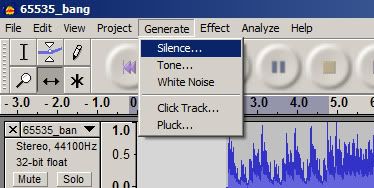

    And put in 2 seconds. (You can put in a bit more if you like, but stick with between 2-3 seconds)
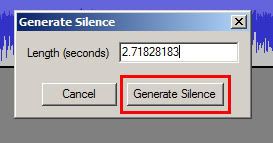
    And click Generate Silence!

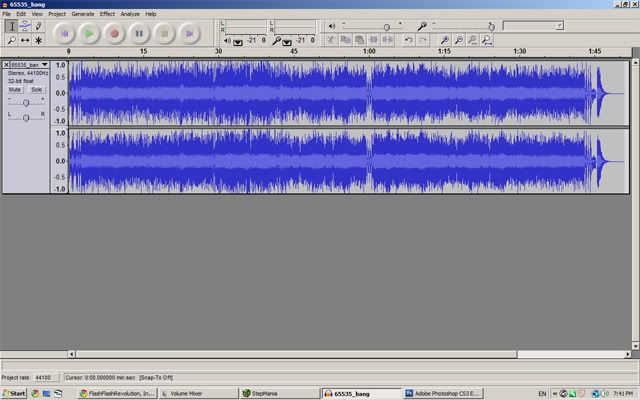
    You should get something that looks like this
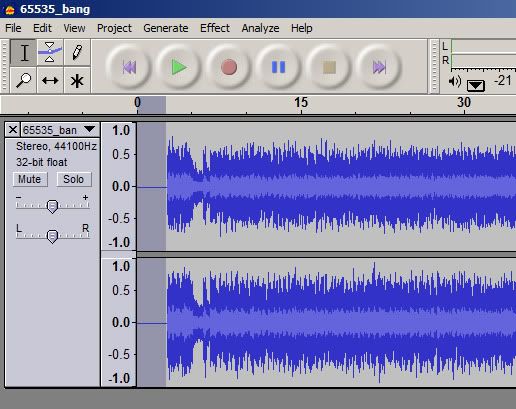

    That's all we need! Hit File -> Export as MP3 to save your handiwork!
    Save to the same location and overwrite the old mp3 for extra easiness!
    And we're done with Audacity! Woohoo!

    Are we completely done yet?
    That depends. If you haven't started stepping your song yet, then we are done! Yay! We can now step our song normally.

    If you have started stepping your song then no, but almost! Because we added silence to the beginning, we have to adjust the beat 0 offset either in Stepmania or in DDReam Studio.
    Make sure to reload songs (Options -> Reload Songs/Courses) in Stepmania after you save your mp3 from Audacity. Then you can adjust the offset from there.

    In either case, subtracting the amount of silence that you added can be used as a baseline for determining the beat 0 offset. It is not exact due to the nature of audio editors, as well as any possible silence that was at the beginning of the song before we edited it. You will still have to dial in the correct offset by ear or using DDReam.

    Refer to any one of these guides for how to set the beat 0 offset:


    ..other guides?

    Other Audacity Tricks

    Cutting a Song

    Why to Cut a Song
    These are a few basic reasons as to why to cut a song:
    1. The song is too long to be stepped in its entirety. Having less of the song to step can sometimes help keep both the stepper and player interested in the simfile.
    2. The song repeats a lot. Cutting can help to remove some repetition from the simfile.
    3. The song is only steppable in a certain part. Cutting allows you to accentuate that part by removing the other parts of the song.

    How to Cut a Song (without vinyl)
    Most important: listen to the song and determine where you would like to cut it.

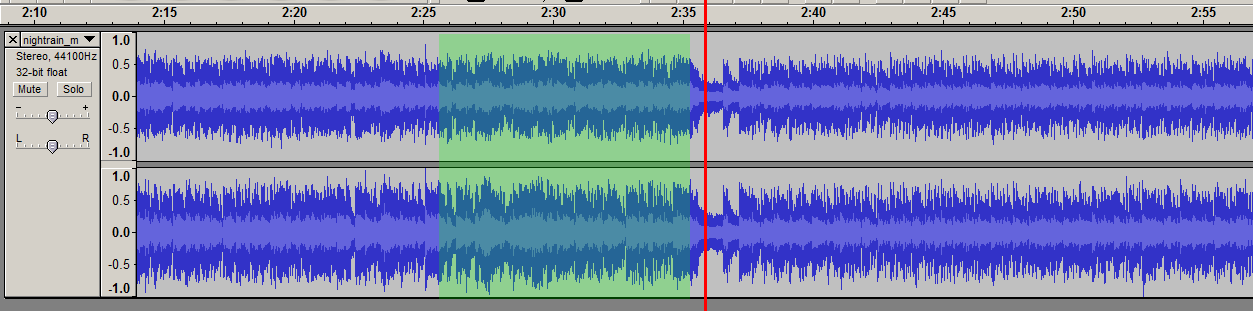
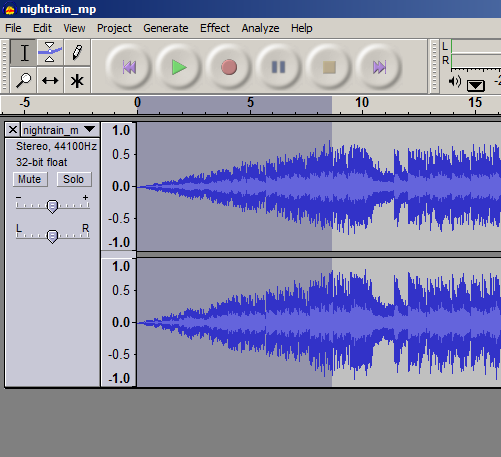
    For example: I wish to start stepping this song at the red line here. However, you should leave about 5-10 seconds before that point to allow room to play with later (green shade).


    In the upper left corner, make sure you have the selection tool

    And click 5-10 seconds before our red line.

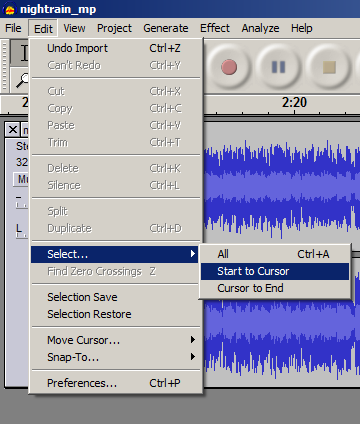
    Now go to Edit -> Select -> Start to Cursor

    And hit delete!

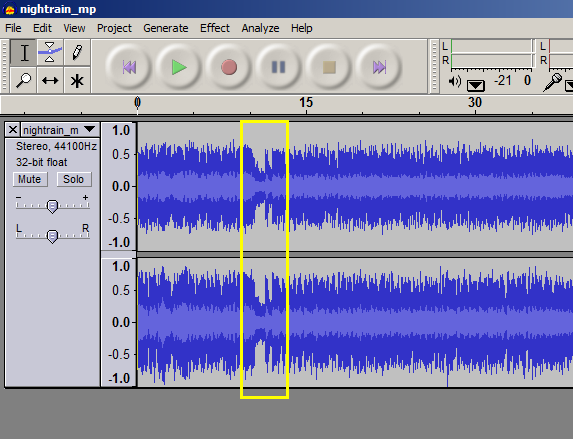
    Now we have this:

    Note that the wave in the yellow box is the exact same as what we were aiming for, and it's now at the beginning! Yippie!!

    ..but I want to chop off the end of a song, not the beginning!!
    No sweat! Choose where you want to end the song, and follow the exact same steps as above except:
    -Click with the selection tool about 5-10 seconds after the point where you want to cut the song.
    -Go to Edit -> Select -> Cursor to End, and hit delete

    Congratulations! You've cut your song..

    But why did we leave 5-10 seconds at the beginning and end?
    You might notice that the result of your work is rather abrupt to begin or end. Read on!

    Fades
    Fades make the music begin and end gradually. They are easy to put in using Audacity as well, however, it may take some trial and error to get a fade that sounds nice. Use your best judgement.

    You can begin your trial and error by simply using the selection tool:

    and clicking about one second before where you plan to step.

    Then choose Edit -> Select -> Start to Cursor (BROTIP: You can also click and drag the selection tool along the waveform to select music.)


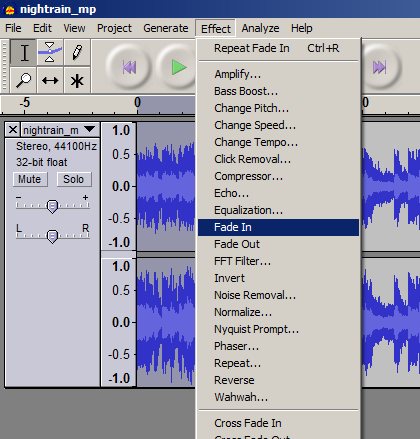
    And now go to Effect -> Fade In


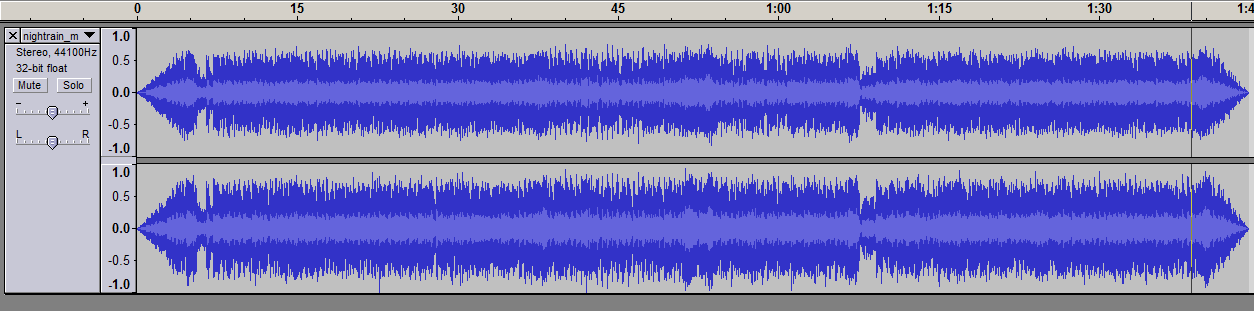
    You'll get something like this:

    This is where the trial and error comes in. You will probably notice that the fade in is too much. If that's the case, hit undo (CTRL+Z on Windows or Edit -> Undo). You can do one of two things:
    1. You can remove a small amount of music from the beginning and try the same steps as above.
    2. You can try a smaller selection, without removing any music.

    You will have to fiddle around with it until you get something you like.
    Keep in mind this key concept:
    The longer the selection, the more gradual the fade.
    The shorter the selection, the more sudden the fade.

    Fades at the End of a Song
    The steps for adding a fade out at the end of a song are exactly the same as above except:
    -Make your selection after where you plan to stop stepping by about 1 second
    -Once you have your selection go to Effect -> Fade Out

    Remember that you have to experiment with fades until you get something that sounds nice.
    Also remember that if you are sending this file to FFR you should account for the converter. You can deliberately sacrifice the beginning of the song in place of adding silence to your submission if you cut from the beginning if you so choose.


    The final result:

    What was once almost 6 minutes is now down to less than 2! Yay!

    More Audacity Tricks??
    ..later..
    planned: volume adjustments..? ...


    Good luck stepping your manias!

    I don't want to do this! Can you do it for me?
    Sure, but it'll cost you credits. PM me and we can work something out.

    Update History:
    21/12/10 - First posted guide
    21/12/10 - Made easier thanks to Halogen
    21/12/10 - T. Hanks dore
    22/12/10 - Added technical details courtesy jimerax
    04/01/11 - Added Cuts and Fades
    04/01/11 - Stuck
    04/01/13 - Ninja edit - updated dead link for LAME encoder.
    09/08/13 - Ninja edit - spoil tag
    Last edited by trumaestro; 08-9-2013, 07:57 PM.
  • behanjc
    stargroup & me are <3'ers
    FFR Simfile Author
    • Jun 2006
    • 1546

    #2
    Re: How (and why) to Add Silence to Your FFR Submission

    Let's have a happy gang bang

    http://www.facebook.com/BehanOfficial
    https://soundcloud.com/behanmusic/powerhouse-ep-preview-out-now

    Comment

    • TC_Halogen
      Rhythm game specialist.
      FFR Simfile Author
      FFR Music Producer
      • Feb 2008
      • 19376

      #3
      Re: How (and why) to Add Silence to Your FFR Submission

      An alternative way to add silence in audacity is to select the entire track, then click the "Generate" tab on top, click silence, and then finally, put in 2.000000 for silence.

      Nice guide, should help a lot of people.

      Comment

      • trumaestro
        I don't get no respect
        FFR Simfile Author
        • Jun 2006
        • 1332

        #4
        Re: How (and why) to Add Silence to Your FFR Submission

        Originally posted by TC_Halogen
        An alternative way to add silence in audacity is to select the entire track, then click the "Generate" tab on top, click silence, and then finally, put in 2.000000 for silence.

        Nice guide, should help a lot of people.
        Well this is the way I've always done it, but your way is a lot easier. I'll change it soon.

        EDIT: Changed!


        Originally posted by behanjc
        Let's have a happy gang bang
        Let's.
        Last edited by trumaestro; 12-21-2010, 10:16 PM.

        Comment

        • TC_Halogen
          Rhythm game specialist.
          FFR Simfile Author
          FFR Music Producer
          • Feb 2008
          • 19376

          #5
          Re: How (and why) to Add Silence to Your FFR Submission

          Also, hit me up if you need any help with a guide on cutting songs; I happen to be really good at that too.

          Comment

          • dore
            caveman pornstar
            FFR Simfile Author
            FFR Music Producer
            • Feb 2006
            • 6317

            #6
            Re: How (and why) to Add Silence to Your FFR Submission

            You might want to add the fact that because of the way any audio editor converts files and whatnot, you can't just subtract however much silence you put in to your old offset. It'll be close, but not exact. The easiest way to get around this is to just add the silence before you start stepping the song if you know you're going to start the chart at the very beginning of the music.
            http://www.youtube.com/watch?v=IREnpHco9mw

            Comment

            • justin_ator
              🥓<strong><span style="col
              • Mar 2007
              • 7648

              #7
              Re: How (and why) to Add Silence to Your FFR Submission

              This is only an issue if there are notes at the very start of the song, correct? If you wait about four seconds into the song anyway because of an intro, it isn't an issue, right?

              Comment

              • trumaestro
                I don't get no respect
                FFR Simfile Author
                • Jun 2006
                • 1332

                #8
                Re: How (and why) to Add Silence to Your FFR Submission

                Originally posted by justin_ator
                This is only an issue if there are notes at the very start of the song, correct? If you wait about four seconds into the song anyway because of an intro, it isn't an issue, right?
                That's not an issue, but your intro will be cut short.

                Adding dore's note..

                Comment

                • dore
                  caveman pornstar
                  FFR Simfile Author
                  FFR Music Producer
                  • Feb 2006
                  • 6317

                  #9
                  Re: How (and why) to Add Silence to Your FFR Submission

                  Originally posted by justin_ator
                  This is only an issue if there are notes at the very start of the song, correct? If you wait about four seconds into the song anyway because of an intro, it isn't an issue, right?
                  as long as there aren't any arrows within the first 1.5ish seconds of the mp3, you're fine.
                  http://www.youtube.com/watch?v=IREnpHco9mw

                  Comment

                  • bmah
                    shots FIRED
                    Profile Moderator
                    FFR Simfile Author
                    Global Moderator
                    • Oct 2003
                    • 8448

                    #10
                    Re: How (and why) to Add Silence to Your FFR Submission

                    Originally posted by justin_ator
                    This is only an issue if there are notes at the very start of the song, correct? If you wait about four seconds into the song anyway because of an intro, it isn't an issue, right?
                    Correct; it's only an issue if your arrows start at the very beginning of the song. 1.4ish secs is around the minimum time when arrows can appear in the game, and about 2.0 secs is around the minimum time when the "READY?" sign disappears.

                    So if you step at the very beginning of a song that begins after one second for instance, you would preferably add an additional second. That would be two seconds total before arrows appear.

                    Comment

                    • justin_ator
                      🥓<strong><span style="col
                      • Mar 2007
                      • 7648

                      #11
                      Re: How (and why) to Add Silence to Your FFR Submission

                      Alright just making sure. I would really like to get something stepped and into FFR. I was starting to step something a friend told me he made, but another person told me they heard it elsewhere, so I'm looking into that for obvious legal/permission reasons.
                      Last edited by justin_ator; 12-21-2010, 11:33 PM.

                      Comment

                      • jimerax
                        FFR Simfile Author
                        FFR Music Producer
                        • Nov 2003
                        • 8185

                        #12
                        Re: How (and why) to Add Silence to Your FFR Submission

                        The dwi converter automatically cuts the first 34-38 frames?, but I forgot the exact number.

                        Actually it's 1.2 secs or so but putting 2 secs silence is absolutely safe.

                        Comment

                        • trumaestro
                          I don't get no respect
                          FFR Simfile Author
                          • Jun 2006
                          • 1332

                          #13
                          Re: How (and why) to Add Silence to Your FFR Submission

                          Better to give a concrete number to add anyway, just for ease of reference.

                          Originally posted by bmah
                          Correct; it's only an issue if your arrows start at the very beginning of the song. 1.4ish secs is around the minimum time when arrows can appear in the game, and about 2.0 secs is around the minimum time when the "READY?" sign disappears.
                          This overlap always bothered me. It's like the game is going ReaWELLTOOBADTAKATAKATAKA

                          Comment

                          • jimerax
                            FFR Simfile Author
                            FFR Music Producer
                            • Nov 2003
                            • 8185

                            #14
                            Re: How (and why) to Add Silence to Your FFR Submission

                            OK I just checked the converter.

                            1st - 35th frames - Being cut in the converter
                            36th frame (1.2 secs) - Earliest frame you can put arrows
                            72nd frame (2.4 secs) - Ready! thing completely disappears

                            Still, the interval between the start of the mp3 and a part the first note is put should be 2 secs or more, it's good for an easily undrstandable rule.
                            Last edited by jimerax; 12-22-2010, 01:34 AM.

                            Comment

                            • who_cares973
                              FFR Player
                              • Aug 2006
                              • 15407

                              #15
                              Re: How (and why) to Add Silence to Your FFR Submission

                              I add silence at the end of files as well as the beginning just so everything is balanced

                              Comment

                              Working...