

(Note: This guide was written with easy to difficult solo charts in mind, but should be applicable in general for keyboard charts. If you want to make pad charts, you'll want to find a pad stepping guide for your pattern information!)
(Also, this thread might give you some other ideas for the theory behind making files: http://www.keybeatonline.com/forums/...ead.php?t=2734 )
=Getting Ready=
[b]-2: You should already have played, looked at, thought about and analyzed lots of charts in the difficulty range and for the playing style you aim to step for. Don't make charts harder or in an area you cannot yourself comfortably do, or you will miss mistakes/awkward things and not know due to your inexperience. For instance, for easy to difficult keyboard 6-key files, you can look through and play these packs for some ideas and experience:
Patashu Solo Beginner Pack
Xiaounlimited Solo Beginner Pack
Xiaounlimited Solo Beginner Pack II
Xiaounlimited Solo Beginner Pack III
(However, not every chart and idea in these packs is good! Be picky - once you can handle a chart, what things remain unfun? Can something be unfun and also more useful as a learning experience than something equivalent but fun?)
-1: If you've never used the editor before,, hit F1 while you are in it and it will display all the controls. You might want to look at a chart someone else has made first, look at all the values and try to edit some patterns to make something new that also follows the music, just to make sure you have the hang of it.
Important controls:
Left and right - change snap of note interval you're placing
Page up, page down - move up and down a measure at a time
home, end - move to the start and end
Tab: Speeds up anything else you're doing, i.e. moving with pageup/pagedown faster or changing the bpm faster.
1, 2, 3, 4, 5, 6, 7, 8 - place notes on that column (up to the number of columns of course) or remove an existing note
1 or other # + up and down - create freeze (and delete notes in its path)
Shift + 1 or other # - create mine
F7, F8: lower/raise bpm. Don't just set this blindly, use Mixmeister BPM Analyzer (rounded to nearest whole number) or http://www.all8.com/tools/bpm.htm to get an estimate of the BPM, and if you later find your song 'drifts' early or late fix it ASAP, don't try to correct it with different coloured notes!
F11, F12: lower/raise beat 0 offset (equivalent to moving chart later/earlier relative to the music - remember, the more negative the offset number is, the later the chart starts relative to the music!) Again, don't set this blindly; refer to section 2 for instructions on getting it as close as possible. If you have to use coloured notes to sync simple rhythms or to the beat, please refer to section 2 and ensure your BPM and offset are as close as possible. Sometimes instruments will go off the beat, but it is far more likely that your chart is going off the beat.
While and only while the chart is playing:
F7: Toggles assist tick.
F8: Toggles autoplay.
Useful options under the esc menu: (varies between versions)
Player options: Contains the speedmod of the chart, raise it if you need more precision. Also lets you swap to reverse scroll and use a different noteskin if it helps.
Song options: Lets you turn assist tick on and off (claps every time a note hits the targets) and lower the music rate (makes it up to three times as easy to tell if a note is on sync or not! A must for making charts)
Also, you can edit fields in the .sm directly, as long as you remember to use 'reload from disk' immediately after saving the .sm so Stepmania knows you edited the .sm!
0: Pick a good song; Something that you both enjoy to listen to and is interesting musically. Just because you're making an easy chart doesn't mean it has to be an easy song. Don't feel like you have to track down an artistic masterpiece either; as long as it's not generic techno it should be fine. The ideal song is 1-3 minutes and has enough variation to allow the charter to keep introducing new elements, (think most songs in IIDX), but don't be discouraged from picking something 'harder' if you think you can handle it.
1: Before even starting to step, listen once or twice through the song. Think about what stands out to you most about the song, and what other elements are interesting, and what the resultant chart might look like. Ensure that the BPM and beat 0 offset are accurate, and clear away as many distractions as possible. Stepping a song is a very flow-inducing activity, and any interruptions (for instance, realizing your bpm is wrong, or coming up upon a section of the song you don't know how to express) may make it difficult to finish.
Decide how many charts you want, and in roughly what difficulty range; a good metric to think about is average notes per measure. Typically, I'd start with a chart that is between 1 and 8 NPS (notes per second) and make each successor chart 2-3 NPS (or between 1.5x-2.0x if you prefer) more dense, depending on what the song offers, until I have made the song's 'main' chart that is as hard as I'd want it to be.
2: To find a song's BPM, use Mixmeister BPM Analyzer on it and round to the nearest 0.05. For songs that are weird or have bpm changes, this number might be inaccurate; in that case, use a stopwatch and count out X beats of the song (16, 32 and 64 are good numbers, the higher the better), divide the time by X and then 60 by that number to get the song's rough BPM.
Alternatively, to find a song's BPM, go to this site: http://www.all8.com/tools/bpm.htm and tap the spacebar to the song's beat (the natural speed at which you nod your head to the song.) Do this for as much of the song as possible and the bpm will get closer and closer to the correct value. This site essentially does the 'stopwatch' method for you.
To find a song's beat 0 offset, turn assist tick on and lay down notes over the chart and progressively adjust one until it lands exactly on the beat. Verify with rate 0.3x, then look up in the top right to find that beat's time stamp; go to the corresponding 4th note spot of the chart, and use F11 and F12 to adjust until it matches that timestamp. Verify it is accurate one last time, then begin stepping.
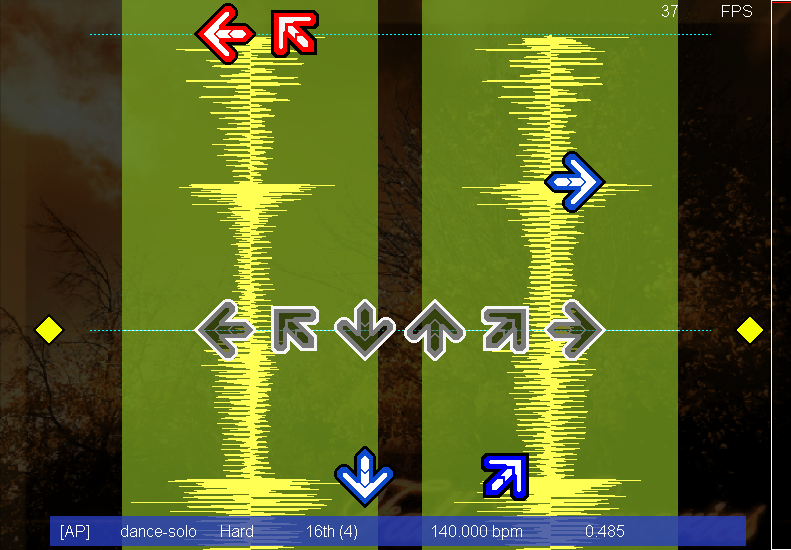
If you're not sure if your beat 0 offset is correct, download DDReam Studio at http://www.ddreamstudio.com/ . Load the chart into it, hit ctrl+down a few times to zoom in, and look at the waveform relative to the notes - if you hit left/right until you're on nosnap, you can click on the start of the waveform and the center of the first note to see the exact millisecond difference (look down in the bottom right) between the two. Then simply edit the .sm's offset by exactly that amount (remember, subtract to make the chart later, add to make the chart earlier!), open it again in ddream to verify they exactly match up and then reload from disk in the editor so Stepmania saves the changes internally. Now, assuming your song has no BPM changes midway, your chart is now perfectly synced!
Is your chart as close to the waveform as the one in this picture?
But what if it does have BPM changes? If so, locate the exact point where the BPM change appears - verify that everything before that, from start to end, is exactly on sync! Now, if the notes drift early, the song is slowing down, so lower the BPM until it syncs again. If the notes drag late, the song is speeding up, so raise the BPM until it syncs again.
-If the BPM changes at exactly one point, you can use http://www.all8.com/tools/bpm.htm to find what the BPM roughly is by not tapping until that BPM change happens, and then tweak it until it syncs on rate 0.3x.
-If the BPM changes over a span of time, make one BPM change every beat or half beat until everything, on rate 0.3x, is as close as you can make it. If you can't notice on rate 0.3x, we won't notice on rate 1.0x playing it!
-If the song is non-constant BPM and changing constantly, your only hope is to do the whole thing on rate 0.3x and make a BPM change every time you see it drift. Alternatively, you can use www.ddreamstudio.com - ddreamstudio.com is designed to place beat positions in time instead of making bpm changes, making it ideal for syncing songs that lack a constant BPM. Nevertheless the process will be hard, but as you do it more you'll get faster at it and learn time saving tricks.
=Onto the Chart=
1: The difficulty of a chart should be roughly consistent. Quieter parts can be easier and louder parts harder, or it can get harder over the course of the song, but it should not start with 8ths and end with 16th jumpstreams. You want to have it such that a player who is just right for the bulk of the song does not wish easy parts were more layered and find hard parts too difficult to be enjoyable.
At all times, you should be following an instrument or combination of instruments that brings your chart up to about the average difficulty you envision for it. If you come up with a way of layering a chart that is too easy/hard for the current chart, save it for one of the other charts. (Layering, by the way, is where you step instruments one at a time, putting one arrow down whenever anything plays. Column relevant techniques are used to keep the feeling of playing one instrument as opposed to another; see 3.)
2: Follow the most prominent sounds, but also try to vary things around to maximize expression and reduce tedium. A song is typically divided up into chunks that are a power of 2 measures in length; 1, 2, 4, 8 or 16 for instance. On these division lines is when new instruments come and go, bursts show up or instruments change their pattern. Every time one of these division lines come up, ask yourself, has anything new and interesting shown up? If so, change your layering scheme to include it. If not, and you think that you've followed your current instruments long enough (how often this will happen depends on how repetitive the song is), look for an instrument or set of instruments that is difficulty-appropriate to follow instead. Alternatively, layer just slightly more.
Whenever something occurs in the song that is one time or otherwise relatively isolated, consider switching your layering to capture it. Whenever there's a melodic or percussive burst, something that plays a high powered rhythm then goes away again, you want to swap your layering to capture that too. Don't leave things unstepped just because they conflict with your layering; expressiveness is more important than technical accuracy.
3: Use column-relevant techniques for your stepping, but if it gets repetitive switch it around. When stepping something like a bass and snare combo, keep one on one hand and one on the other; say column 1 and 4. (For harder charts you can place them on the same hand.) If you have to repeat it more than 2-4 times, depending on the length of the pattern and the song, then change what columns it's on or, if you like, make the bass go on any left hand columns and the snare on any right hand columns.
When stepping a melody, pitch relevance should be used; going left when a note is lower, right when a note is higher, repeating columns when the same pitch is repeated within a given melody. However, if this creates overly one-handed patterns that are too hard for the current difficulty, shift it a bit to spread it out over both hands. If a melody repeats too often, especially a short one, vary it up as well; you can shift parts of it to the left or to the right, flip two columns, or even run it in mirror.
4: If a prominent instrument is too hard for the current difficulty, step a simplified version. Don't force yourself to look for things that can be stepped perfectly to fit the difficulty, otherwise you'll find yourself ending up with bass and hi hat combos for easy charts over and over again. Instead, melodies can typically be simplified as follows; for anything that is straight 16ths, step it as 8ths whenever it starts, continues through or ends on an 8th. If it starts or ends on a 16th, place a note on the 16th instead of (or in addition to) the surrounding 8ths, assuming it is emphasized enough within the song; you can use such isolated 16ths in easy charts so long as they are very clear in the song. If this is still not easy enough, break the melody down into different 'parts', decide which sounds more important to you and step only that with 8ths.
Pitch relevance should still be applied, but in an exaggerated fashion (for instance a 16th trill would not become an 8th jack, but an 8th trill; you might decide to step 4 note 16th rolls as 4 note 8th rolls, and so on). Minijacks should be avoided if they are particularly fast. Faster bursts can either be made 16ths or given a note only when they begin ala IIDX. You can do similar simplifications with percussive elements and so on.
5: Make sure your patterns are not awkward unless warranted. Relatively easy sections for the chart can be stepped harder, but the bulk of the song and especially the hardest parts should be straight forward. The following patterns are considered more difficult than others. Use only in moderation:
-Excessive trilling between columns 1 and 2 or 5 and 6.
-Complicated, snaky one handed patterns over 123 or 456, e.g. 1323121321.
-Patterns with jumps that induce brackets, e.g. 13 2 13 2 or 46 5 46 5.
-Patterns that force you to hold a freeze then hit many notes on the same hand, especially if the freeze is on 2 or 5.
-Very large chords that are asymmetric and have no leadup; for instance, hitting 12 then 46 then 1246 would be a valid way to introduce a 4-chord. There are 20 types of 3-chords and 15 types of 4-chords, and it takes a lot of muscle memory to learn them all; keep this in mind.
6: Special provisions for beginner level charts. When you are only just starting out, you do not have any muscle memory yet; the very first stepping stone is to firmly drill into your head that each finger associates with a certain column. As such, patterns in beginner charts should be hyperrepetitive and very closely associated with what part of the song they belong to; this way less concentration has to be on reading and muscle memory can be picked up quicker. For solo charts, certain patterns are far easier to pick up on; for instance, notes adjacent to the last column hit, note pairs on opposite columns and notes on the outermost columns. 2-chords should be abstained from unless they are either lead into by the previous notes (e.g. 1 3 13) or occupying adjacent/opposite columns.
7: Avoid boring bass drums. In most songs the bass drum plays a constant 4th beat; this is never unusual and barely ever worth noting. Step it if it is doing something different or if you have nothing else to reach the desired difficulty with, but most of the time ignore it.
8: Playtest. If you don't play the charts you make, you'll miss things that are awkward or incorrect. More importantly, you'll know if you like it or not. Playtest after revisions, too; don't assume you didn't mess something else up by mistake.
(Also, this thread might give you some other ideas for the theory behind making files: http://www.keybeatonline.com/forums/...ead.php?t=2734 )
=Getting Ready=
[b]-2: You should already have played, looked at, thought about and analyzed lots of charts in the difficulty range and for the playing style you aim to step for. Don't make charts harder or in an area you cannot yourself comfortably do, or you will miss mistakes/awkward things and not know due to your inexperience. For instance, for easy to difficult keyboard 6-key files, you can look through and play these packs for some ideas and experience:
Patashu Solo Beginner Pack
Xiaounlimited Solo Beginner Pack
Xiaounlimited Solo Beginner Pack II
Xiaounlimited Solo Beginner Pack III
(However, not every chart and idea in these packs is good! Be picky - once you can handle a chart, what things remain unfun? Can something be unfun and also more useful as a learning experience than something equivalent but fun?)
-1: If you've never used the editor before,, hit F1 while you are in it and it will display all the controls. You might want to look at a chart someone else has made first, look at all the values and try to edit some patterns to make something new that also follows the music, just to make sure you have the hang of it.
Important controls:
Left and right - change snap of note interval you're placing
Page up, page down - move up and down a measure at a time
home, end - move to the start and end
Tab: Speeds up anything else you're doing, i.e. moving with pageup/pagedown faster or changing the bpm faster.
1, 2, 3, 4, 5, 6, 7, 8 - place notes on that column (up to the number of columns of course) or remove an existing note
1 or other # + up and down - create freeze (and delete notes in its path)
Shift + 1 or other # - create mine
F7, F8: lower/raise bpm. Don't just set this blindly, use Mixmeister BPM Analyzer (rounded to nearest whole number) or http://www.all8.com/tools/bpm.htm to get an estimate of the BPM, and if you later find your song 'drifts' early or late fix it ASAP, don't try to correct it with different coloured notes!
F11, F12: lower/raise beat 0 offset (equivalent to moving chart later/earlier relative to the music - remember, the more negative the offset number is, the later the chart starts relative to the music!) Again, don't set this blindly; refer to section 2 for instructions on getting it as close as possible. If you have to use coloured notes to sync simple rhythms or to the beat, please refer to section 2 and ensure your BPM and offset are as close as possible. Sometimes instruments will go off the beat, but it is far more likely that your chart is going off the beat.
While and only while the chart is playing:
F7: Toggles assist tick.
F8: Toggles autoplay.
Useful options under the esc menu: (varies between versions)
Player options: Contains the speedmod of the chart, raise it if you need more precision. Also lets you swap to reverse scroll and use a different noteskin if it helps.
Song options: Lets you turn assist tick on and off (claps every time a note hits the targets) and lower the music rate (makes it up to three times as easy to tell if a note is on sync or not! A must for making charts)
Also, you can edit fields in the .sm directly, as long as you remember to use 'reload from disk' immediately after saving the .sm so Stepmania knows you edited the .sm!
0: Pick a good song; Something that you both enjoy to listen to and is interesting musically. Just because you're making an easy chart doesn't mean it has to be an easy song. Don't feel like you have to track down an artistic masterpiece either; as long as it's not generic techno it should be fine. The ideal song is 1-3 minutes and has enough variation to allow the charter to keep introducing new elements, (think most songs in IIDX), but don't be discouraged from picking something 'harder' if you think you can handle it.
1: Before even starting to step, listen once or twice through the song. Think about what stands out to you most about the song, and what other elements are interesting, and what the resultant chart might look like. Ensure that the BPM and beat 0 offset are accurate, and clear away as many distractions as possible. Stepping a song is a very flow-inducing activity, and any interruptions (for instance, realizing your bpm is wrong, or coming up upon a section of the song you don't know how to express) may make it difficult to finish.
Decide how many charts you want, and in roughly what difficulty range; a good metric to think about is average notes per measure. Typically, I'd start with a chart that is between 1 and 8 NPS (notes per second) and make each successor chart 2-3 NPS (or between 1.5x-2.0x if you prefer) more dense, depending on what the song offers, until I have made the song's 'main' chart that is as hard as I'd want it to be.
2: To find a song's BPM, use Mixmeister BPM Analyzer on it and round to the nearest 0.05. For songs that are weird or have bpm changes, this number might be inaccurate; in that case, use a stopwatch and count out X beats of the song (16, 32 and 64 are good numbers, the higher the better), divide the time by X and then 60 by that number to get the song's rough BPM.
Alternatively, to find a song's BPM, go to this site: http://www.all8.com/tools/bpm.htm and tap the spacebar to the song's beat (the natural speed at which you nod your head to the song.) Do this for as much of the song as possible and the bpm will get closer and closer to the correct value. This site essentially does the 'stopwatch' method for you.
To find a song's beat 0 offset, turn assist tick on and lay down notes over the chart and progressively adjust one until it lands exactly on the beat. Verify with rate 0.3x, then look up in the top right to find that beat's time stamp; go to the corresponding 4th note spot of the chart, and use F11 and F12 to adjust until it matches that timestamp. Verify it is accurate one last time, then begin stepping.
If you're not sure if your beat 0 offset is correct, download DDReam Studio at http://www.ddreamstudio.com/ . Load the chart into it, hit ctrl+down a few times to zoom in, and look at the waveform relative to the notes - if you hit left/right until you're on nosnap, you can click on the start of the waveform and the center of the first note to see the exact millisecond difference (look down in the bottom right) between the two. Then simply edit the .sm's offset by exactly that amount (remember, subtract to make the chart later, add to make the chart earlier!), open it again in ddream to verify they exactly match up and then reload from disk in the editor so Stepmania saves the changes internally. Now, assuming your song has no BPM changes midway, your chart is now perfectly synced!
Is your chart as close to the waveform as the one in this picture?
But what if it does have BPM changes? If so, locate the exact point where the BPM change appears - verify that everything before that, from start to end, is exactly on sync! Now, if the notes drift early, the song is slowing down, so lower the BPM until it syncs again. If the notes drag late, the song is speeding up, so raise the BPM until it syncs again.
-If the BPM changes at exactly one point, you can use http://www.all8.com/tools/bpm.htm to find what the BPM roughly is by not tapping until that BPM change happens, and then tweak it until it syncs on rate 0.3x.
-If the BPM changes over a span of time, make one BPM change every beat or half beat until everything, on rate 0.3x, is as close as you can make it. If you can't notice on rate 0.3x, we won't notice on rate 1.0x playing it!
-If the song is non-constant BPM and changing constantly, your only hope is to do the whole thing on rate 0.3x and make a BPM change every time you see it drift. Alternatively, you can use www.ddreamstudio.com - ddreamstudio.com is designed to place beat positions in time instead of making bpm changes, making it ideal for syncing songs that lack a constant BPM. Nevertheless the process will be hard, but as you do it more you'll get faster at it and learn time saving tricks.
=Onto the Chart=
1: The difficulty of a chart should be roughly consistent. Quieter parts can be easier and louder parts harder, or it can get harder over the course of the song, but it should not start with 8ths and end with 16th jumpstreams. You want to have it such that a player who is just right for the bulk of the song does not wish easy parts were more layered and find hard parts too difficult to be enjoyable.
At all times, you should be following an instrument or combination of instruments that brings your chart up to about the average difficulty you envision for it. If you come up with a way of layering a chart that is too easy/hard for the current chart, save it for one of the other charts. (Layering, by the way, is where you step instruments one at a time, putting one arrow down whenever anything plays. Column relevant techniques are used to keep the feeling of playing one instrument as opposed to another; see 3.)
2: Follow the most prominent sounds, but also try to vary things around to maximize expression and reduce tedium. A song is typically divided up into chunks that are a power of 2 measures in length; 1, 2, 4, 8 or 16 for instance. On these division lines is when new instruments come and go, bursts show up or instruments change their pattern. Every time one of these division lines come up, ask yourself, has anything new and interesting shown up? If so, change your layering scheme to include it. If not, and you think that you've followed your current instruments long enough (how often this will happen depends on how repetitive the song is), look for an instrument or set of instruments that is difficulty-appropriate to follow instead. Alternatively, layer just slightly more.
Whenever something occurs in the song that is one time or otherwise relatively isolated, consider switching your layering to capture it. Whenever there's a melodic or percussive burst, something that plays a high powered rhythm then goes away again, you want to swap your layering to capture that too. Don't leave things unstepped just because they conflict with your layering; expressiveness is more important than technical accuracy.
3: Use column-relevant techniques for your stepping, but if it gets repetitive switch it around. When stepping something like a bass and snare combo, keep one on one hand and one on the other; say column 1 and 4. (For harder charts you can place them on the same hand.) If you have to repeat it more than 2-4 times, depending on the length of the pattern and the song, then change what columns it's on or, if you like, make the bass go on any left hand columns and the snare on any right hand columns.
When stepping a melody, pitch relevance should be used; going left when a note is lower, right when a note is higher, repeating columns when the same pitch is repeated within a given melody. However, if this creates overly one-handed patterns that are too hard for the current difficulty, shift it a bit to spread it out over both hands. If a melody repeats too often, especially a short one, vary it up as well; you can shift parts of it to the left or to the right, flip two columns, or even run it in mirror.
4: If a prominent instrument is too hard for the current difficulty, step a simplified version. Don't force yourself to look for things that can be stepped perfectly to fit the difficulty, otherwise you'll find yourself ending up with bass and hi hat combos for easy charts over and over again. Instead, melodies can typically be simplified as follows; for anything that is straight 16ths, step it as 8ths whenever it starts, continues through or ends on an 8th. If it starts or ends on a 16th, place a note on the 16th instead of (or in addition to) the surrounding 8ths, assuming it is emphasized enough within the song; you can use such isolated 16ths in easy charts so long as they are very clear in the song. If this is still not easy enough, break the melody down into different 'parts', decide which sounds more important to you and step only that with 8ths.
Pitch relevance should still be applied, but in an exaggerated fashion (for instance a 16th trill would not become an 8th jack, but an 8th trill; you might decide to step 4 note 16th rolls as 4 note 8th rolls, and so on). Minijacks should be avoided if they are particularly fast. Faster bursts can either be made 16ths or given a note only when they begin ala IIDX. You can do similar simplifications with percussive elements and so on.
5: Make sure your patterns are not awkward unless warranted. Relatively easy sections for the chart can be stepped harder, but the bulk of the song and especially the hardest parts should be straight forward. The following patterns are considered more difficult than others. Use only in moderation:
-Excessive trilling between columns 1 and 2 or 5 and 6.
-Complicated, snaky one handed patterns over 123 or 456, e.g. 1323121321.
-Patterns with jumps that induce brackets, e.g. 13 2 13 2 or 46 5 46 5.
-Patterns that force you to hold a freeze then hit many notes on the same hand, especially if the freeze is on 2 or 5.
-Very large chords that are asymmetric and have no leadup; for instance, hitting 12 then 46 then 1246 would be a valid way to introduce a 4-chord. There are 20 types of 3-chords and 15 types of 4-chords, and it takes a lot of muscle memory to learn them all; keep this in mind.
6: Special provisions for beginner level charts. When you are only just starting out, you do not have any muscle memory yet; the very first stepping stone is to firmly drill into your head that each finger associates with a certain column. As such, patterns in beginner charts should be hyperrepetitive and very closely associated with what part of the song they belong to; this way less concentration has to be on reading and muscle memory can be picked up quicker. For solo charts, certain patterns are far easier to pick up on; for instance, notes adjacent to the last column hit, note pairs on opposite columns and notes on the outermost columns. 2-chords should be abstained from unless they are either lead into by the previous notes (e.g. 1 3 13) or occupying adjacent/opposite columns.
7: Avoid boring bass drums. In most songs the bass drum plays a constant 4th beat; this is never unusual and barely ever worth noting. Step it if it is doing something different or if you have nothing else to reach the desired difficulty with, but most of the time ignore it.
8: Playtest. If you don't play the charts you make, you'll miss things that are awkward or incorrect. More importantly, you'll know if you like it or not. Playtest after revisions, too; don't assume you didn't mess something else up by mistake.