

This thread is an offshoot of Keine's Class on the Official [Touhou Discussion] Thread.
March 29th, 2009: We have two new networks. The old one is obsolete.
FFR Touhou Online: IAMP
pass is eyeamp
FFR Touhou Online: SWR
pass is swurr
Please join the appropriate network if you only play one
This is a remake of Midday's thread. Since he left, I have taken over this thread in his stead as admin. It will function essentially the same, save for a few minor changes as I see fit.
The thread purpose is to gather all of the FFR community members who play the competitive online Touhou games and discuss. Please DO NOT ASK where you can download Touhou games on the FFR FORUMS. (hint hint) Go buy them if need be.
Use Ctrl+F to find broad terms or certain sections (type in the code beside it in the Table of Contents).
TABLE OF CONTENTS
I) Code of Conduct [1COC]
II) Screenshots [3SCN]
III) The Online Games [4TOG]
IV) FFR Hamachi Network [5HAM]
V) Playing the Game [6PTG]
VI) Troubleshooting [7TSH]
VII) Tournaments [8TNM]
VIII) Credits [9CRD]
IX) Links [10LK]
X) Member List [11ML]
I) Code of Conduct [1COC]
By joining our collective Touhou Online community, I expect you to follow the following rules.
1) You follow the standard FFR Forum rules. This includes enough conventional typing, no flaming/name-calling, no offensive words, etc. Read the forum rules here.
2) You will never post the following:
3) You will never lie about your wins/losses, or bait a newbie with false statistics. You will never lie to newbies about anything concerning gameplay, online directions, or Touhou history. If you're not sure, reference the newbie to someone better or the first post. You will never lie to me about someone else's conduct.
4) You will never do any of the aforementioned things to other people outside of this thread. I will consider reports from various players (provided they have some sort of proof).
Other notes:
Don't change your Hamachi alias without reason, and tell me when you do so. Please, it gets too confusing.
II) Screenshots [3SCN]
IaMP Character select
IaMP Yuyuko's butterfly level 1, Death Sign "Ghastly Dream"
IaMP Mid-battle, with all black palettes
IaMP Spell Break (end of a round)
PoFV Character Select
PoFV Lily appears, with Cirno Level 4 spell on the right
PoFV Results Screen
SWR Character Selection (Remilia and Marisa)
SWR Knock Out (end of a round)
SWR Suika's ????? (Story Normal Mode)
III) The Online Games [4TOG]
General information on how to play can be found in each of the subsections at http://touhou.wikia.com/wiki/Touhou_Wiki.
Touhou 7.5 (TH075): Immaterial and Missing Power:[/B] The first Touhou game to have an online function. It's a one on one fighting game created by Twilight Frontier, following ZUN's traditional Touhou storyline. The online function is stable and usable. However, an addon called CowCaster is necessary. This game is for advanced players who have experience in previous fighting games. Combos are manually created with no mashing enhancements. Combo input and operating spellcards is much more complicated than SWR.
IaMP Wiki (Updates/patches, tips/skills, and info on Immaterial and Missing Power)
You need the FULL version of IaMP (approx. 1 gigabyte) to play online. Your IaMP folder should have NO Japanese characters in it, or it won't work online. Remove them if they are there. You need, in this order:
Update 1.11: http://www.tasofro.net/arc/th075_111s.exe
Character Download: http://iamp.mizuumi.net/stuff/tools/score.dat[list][*]Place it in your IaMP folder.[*]If asked to replace, choose yes. You must have installed the version 1.11 update.
CowCaster: http://mauve.sandwich.net/iamp/CowCaster-080326.zip
These are addons you do not need, but are here if you do wish to use them.
English Patch v1.00: http://www.gensokyo.org/IaMPEnglishT...tion-v1_00.exe
CowCaster mod for English patch: http://mauve.sandwich.net/iamp/CowCaster-080823a.zip
Palette Editor Japanese: http://iamp.mizuumi.net/stuff/tools/PaletteEditor.zip
Palette Editor English http://mauve.sandwich.net/misc/th075cpe_english.zip
Palette Wiki: http://iamp.mizuumi.net/index.php/Color_editor
Videos:
Tohgeki/Tougeki (??) Official Tournament Videos:
These are the best of the best; you can learn much by just watching them.
on Nicovideo: http://www.nicovideo.jp/search/%E6%9D%B1%E5%8A%87
on YouTube: http://www.youtube.com/results?searc...rch_type=&aq=f
Tutorial: http://www.youtube.com/watch?v=H5NyiGU5EOg
ArmandoXIII booster data (for CowCaster option 9): http://stuff.mizuumi.net/iamp/ArmandoBooster09Jan08.rar
Touhou 9 (TH09): Phantasmagoria of Flower View: The online function for this game is extremely unstable. However, it is still be possible to play online in certain cases. This a one on one shooter. Creating combos and increasing your points without touching any projectiles. Fairly simple concept and controls compared to the fighters, but intense considering that the controls are equally easy for both players.
Netplay patch: http://www16.big.or.jp/~zun/data/soft/th09_ver150a.lzh
Touhou 10.5 (TH105): Scarlet Weather Rhapsody: Tasofro ZUN game #2, another one on one fighting game. The online is stable. However, online only works if both players have the newest updates. Download and install in order. This game is for beginners. Combos are preset by mashing single buttons, while extensions and spellcards can be manipulated by equipping various cards.
SWR requires DirectX: http://www.microsoft.com/downloads/d...DisplayLang=en
Necessary .dll: http://www.dll-files.com/dllindex/d3...zip?0VDhXBZElW
SWR Wiki
Update1: http://mirror0.fuzzy2.com/2008/05/ta...update_101.exe
Update2: http://mirror0.fuzzy2.com/2008/06/ta...update_102.exe
Update3: http://202.222.30.246/touhou105/download.html (v1.03)
Update4: http://www.tasofro.net/touhou105/download.html (v1.06)
If any updates come out, please inform me. I don't play SWR, so I wouldn't know.
Full character/deck card download: http://swr.mizuumi.net/stuff/score.dat
No weather hack: http://mauve.sandwich.net/misc/th105_102_noweather.exe
English weather hack: http://stuff.mizuumi.net/swr/weather-patch.rar
IV) FFR Hamachi Network [5HAM]
Unlike Midday, I do not see a reason to hide this. I will just evict users as needed.
We can all play each other and watch each other's games using the same Hamachi network. This program is only necessary for SWR and PoFV. IaMP is done mostly through relays (option 7 on CowCaster), but Hamachi may be used.
Hamachi free download/install:
https://secure.logmein.com/products/...pn.asp?lang=en
Setting up Hamachi and joining our network:
How to Contact a Player:
Start a chat (right click name and chat, or double click). Hamachi will notify a new chat window. Chat away.
Other Hamachi functions:
Most of them are self explanatory on the preferences, but:
Enable status changes in the menu, please.
Go into your preferences and set it so it is like this:
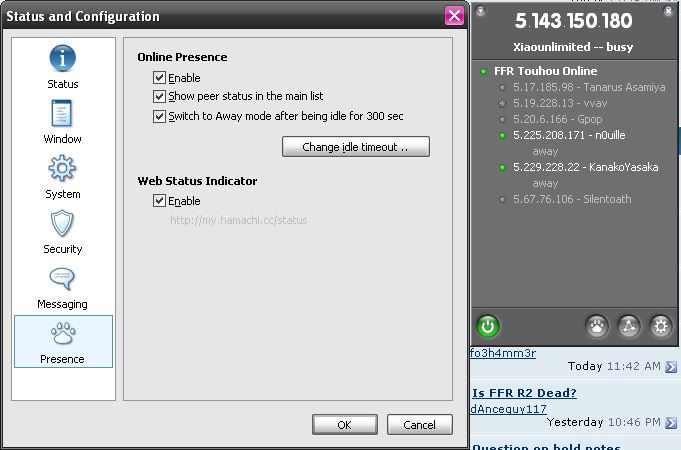
Then from the menu with the paw button on the main window, you can set your status, which instantly notifies the channel.
The last checkbox allows users of the Hamachi network to allow others know if they're currently on or not without having to sign on. For example, my Hamachi IP is 5.143.150.180 and that IP is currently:

The link is:
Replace the .x.x.x with your IP for the Hamachi icon. I will place these under the names of any member who joins the Hamachi network.
Please enable the Web Status Indicator in your Presence preferences.
V) Playing the Game [6PTG]
Pregame Notices:
IaMP: Have CowCaster and th7.5 in the same folder. You must be updated to v1.11.
Key config must be set to player 1, even if you end up as player 2.
PoFV: Patch. Use the link above.
SWR: Make sure your key configuration/battle deck is set to player 1. You cannot play online with player2 settings. Even if you don't have every card, the opponent can use cards that you don't have. However, the stages/music is restricted to what both players have. One cannot play at the Koumakan Lobby if one of the players haven't reached that point in story mode yet.
IMPORTANT:
Custom rule: No damage may be inflicted during Typhoon weather, or Ambient Light with Typhoon effect weather. You may choose to ignore this if both players consent.
How to Make a Game:
For IaMP (relay): Start CowCaster (make sure you have CowCaster and th7.5 in the same folder. Enter name/second name. Type in "7" (without quotes) for Standby mode and press enter. Press enter again (for mizuumi.net). Wait for other player to join. First player sets delay count. This is known as relaying.
NOTE: Delay 1-5 is optimal. 6-7 is bearable if you're patient, but you will likely get lagged inputs or dropped ones altogether. 8+ is basically unplayable.
For IaMP (host): Test your port with mizuumi.net using opton 8 after entering names. Test both ports using Hamachi and nonHamachi. If it says bad, stick with relay. If it's good, then select option 1. Wait for access from the other user.
For PoFV: Open IP.txt and replace IP address with Hamachi's IP Address. Leave the sync rate either high or LAN. the one without the semicolon is the saved setting. Save IP.txt. Start up PoFV, and go into match mode, pick the bottom option. It'll flash between two messages until both you and your friend are on that screen, and connected to each other. (It looks like it freezes, don't worry about this.) Once you're connected, you'll experience whatever lag you're going to receive immediately, and be pushed to difficulty menu, then character select.
For SWR: Start SWR after you connect to the FFR Hamachi Network. Select VsNetwork. Select the first choice (????????). Make the port number 10800 (should be default). The next question asks whether viewers are allowed. Left is yes, right is no. Wait for a response. (You can be working on other things as long as you leave the volume on. You can hear a ringing noise when someone enters, or the noise character selection.)
How to Join a Game:
For IaMP (relay): Start CowCaster (make sure you have CowCaster and th7.5 in the same folder. Enter name/second name. Input 7 for Standby mode and press enter. Press enter again (for mizuumi.net). First player sets delay count. See above for notes on delay.
For IaMP (host): Option 2 (try access). Input the IP that works for your opponent, if they can host.
For PoFV: Open IP.txt and replace IP address with Hamachi's IP Address. You can also change the sync rate. Put a ; in front of whichever sync rate doesn't have one, and delete the ; in front of the sync rate that you want. Lower sync rates will produce better frame rates. Start up PoFV, and go into match mode, pick the bottom option. It'll flash between two messages until both you and your friend are on that screen, and connected to each other. (It looks like it freezes, don't worry about this.) Once you're connected, you'll experience whatever lag you're going to receive immediately, and be pushed to difficulty menu, then character select.
For SWR (first time opponent): Start SWR after you connect to the FFR Hamachi Network. Select VsNetwork. Select the second choice (IP????????????????). Enter the Hamachi IP Address of your opponent. Port number should be 10800 (default). If successful, the character selection screen should come up immediately.
For SWR (second time opponent): As stated above, then: Select the 4th choice (???????????). The IP Address of the opponent should be listed there. Same as above for rest.
How to Watch a Game:
For IaMP: Start CC and choose 3 (spectate). Input IP address of player you want to watch. Note: IP could be Hamachi or not depending on whether the player is signed in or not. If it goes in fast forward, it means you are behind the action and it is speeding you up so you can reach the point where the action is real-time.
For SWR: Start SWR and choose Vs Network and choose the 2nd option. Write the IP of the player you want to watch. IP could be Hamachi or not depending on whether the player is signed in or not.
VI) Troubleshooting [7TSH]
Your computer shows @#(*&@(#!()^)@#!(
You need to install a Japanese language pack. For Windows, this can be accessed through your Control Panel. Follow this sequence: Control Panel -> (Category View) Date Time Language Regional Options -> Add Other Languages -> Install files for East Asian Languages -> reboot.
Here's a list of some basic connection techs. Know how to change your router settings. You should always have your router options bookmarked/favorited.
VII) Tournaments [8TNM]
Nothing right now.
Improvements
Anything? Just post.
VIII) Credits [9CRD]
Xx{Midday}xX: The original creator of the thread.
Xiaounlimited: IaMP "tutor", graphics designer, new admin of the thread.
ddr_f4n: Initial reviewer, Official Touhou Thread admin.
All players who join the Touhou Online.
IX) Links [10LK]
Twilight Frontier: http://www.tasofro.net/
TouhouWiki: http://touhou.wikia.com/wiki/Touhou_Wiki
Team Shanghai Alice: http://www16.big.or.jp/~zun/
March 29th, 2009: We have two new networks. The old one is obsolete.
FFR Touhou Online: IAMP
pass is eyeamp
FFR Touhou Online: SWR
pass is swurr
Please join the appropriate network if you only play one
This is a remake of Midday's thread. Since he left, I have taken over this thread in his stead as admin. It will function essentially the same, save for a few minor changes as I see fit.
The thread purpose is to gather all of the FFR community members who play the competitive online Touhou games and discuss. Please DO NOT ASK where you can download Touhou games on the FFR FORUMS. (hint hint) Go buy them if need be.
Use Ctrl+F to find broad terms or certain sections (type in the code beside it in the Table of Contents).
TABLE OF CONTENTS
I) Code of Conduct [1COC]
II) Screenshots [3SCN]
III) The Online Games [4TOG]
IV) FFR Hamachi Network [5HAM]
V) Playing the Game [6PTG]
VI) Troubleshooting [7TSH]
VII) Tournaments [8TNM]
VIII) Credits [9CRD]
IX) Links [10LK]
X) Member List [11ML]
I) Code of Conduct [1COC]
By joining our collective Touhou Online community, I expect you to follow the following rules.
1) You follow the standard FFR Forum rules. This includes enough conventional typing, no flaming/name-calling, no offensive words, etc. Read the forum rules here.
2) You will never post the following:
- generic wins/losses
- persistent invite for online play (get an IM system)
3) You will never lie about your wins/losses, or bait a newbie with false statistics. You will never lie to newbies about anything concerning gameplay, online directions, or Touhou history. If you're not sure, reference the newbie to someone better or the first post. You will never lie to me about someone else's conduct.
4) You will never do any of the aforementioned things to other people outside of this thread. I will consider reports from various players (provided they have some sort of proof).
Other notes:
Don't change your Hamachi alias without reason, and tell me when you do so. Please, it gets too confusing.
II) Screenshots [3SCN]
IaMP Character select
IaMP Yuyuko's butterfly level 1, Death Sign "Ghastly Dream"
IaMP Mid-battle, with all black palettes
IaMP Spell Break (end of a round)
PoFV Character Select
PoFV Lily appears, with Cirno Level 4 spell on the right
PoFV Results Screen
SWR Character Selection (Remilia and Marisa)
SWR Knock Out (end of a round)
SWR Suika's ????? (Story Normal Mode)
III) The Online Games [4TOG]
General information on how to play can be found in each of the subsections at http://touhou.wikia.com/wiki/Touhou_Wiki.
Touhou 7.5 (TH075): Immaterial and Missing Power:[/B] The first Touhou game to have an online function. It's a one on one fighting game created by Twilight Frontier, following ZUN's traditional Touhou storyline. The online function is stable and usable. However, an addon called CowCaster is necessary. This game is for advanced players who have experience in previous fighting games. Combos are manually created with no mashing enhancements. Combo input and operating spellcards is much more complicated than SWR.
IaMP Wiki (Updates/patches, tips/skills, and info on Immaterial and Missing Power)
You need the FULL version of IaMP (approx. 1 gigabyte) to play online. Your IaMP folder should have NO Japanese characters in it, or it won't work online. Remove them if they are there. You need, in this order:
Update 1.11: http://www.tasofro.net/arc/th075_111s.exe
- Place the .exe in your IaMP folder.
- Direct it to your IaMP folder.
- Install.
Character Download: http://iamp.mizuumi.net/stuff/tools/score.dat[list][*]Place it in your IaMP folder.[*]If asked to replace, choose yes. You must have installed the version 1.11 update.
CowCaster: http://mauve.sandwich.net/iamp/CowCaster-080326.zip
- Copy every file from the "exe" folder into your IaMP folder.
- The config_caster.ini file has instructions in it. Set your player name and tag.
These are addons you do not need, but are here if you do wish to use them.
English Patch v1.00: http://www.gensokyo.org/IaMPEnglishT...tion-v1_00.exe
CowCaster mod for English patch: http://mauve.sandwich.net/iamp/CowCaster-080823a.zip
Palette Editor Japanese: http://iamp.mizuumi.net/stuff/tools/PaletteEditor.zip
Palette Editor English http://mauve.sandwich.net/misc/th075cpe_english.zip
Palette Wiki: http://iamp.mizuumi.net/index.php/Color_editor
Videos:
Tohgeki/Tougeki (??) Official Tournament Videos:
These are the best of the best; you can learn much by just watching them.
on Nicovideo: http://www.nicovideo.jp/search/%E6%9D%B1%E5%8A%87
on YouTube: http://www.youtube.com/results?searc...rch_type=&aq=f
Tutorial: http://www.youtube.com/watch?v=H5NyiGU5EOg
ArmandoXIII booster data (for CowCaster option 9): http://stuff.mizuumi.net/iamp/ArmandoBooster09Jan08.rar
- There should be instructions inside. If not, just place the folders with the character names into the "dat" folder of your IaMP directory.
Touhou 9 (TH09): Phantasmagoria of Flower View: The online function for this game is extremely unstable. However, it is still be possible to play online in certain cases. This a one on one shooter. Creating combos and increasing your points without touching any projectiles. Fairly simple concept and controls compared to the fighters, but intense considering that the controls are equally easy for both players.
Netplay patch: http://www16.big.or.jp/~zun/data/soft/th09_ver150a.lzh
Touhou 10.5 (TH105): Scarlet Weather Rhapsody: Tasofro ZUN game #2, another one on one fighting game. The online is stable. However, online only works if both players have the newest updates. Download and install in order. This game is for beginners. Combos are preset by mashing single buttons, while extensions and spellcards can be manipulated by equipping various cards.
SWR requires DirectX: http://www.microsoft.com/downloads/d...DisplayLang=en
Necessary .dll: http://www.dll-files.com/dllindex/d3...zip?0VDhXBZElW
- Put the d3dx_d9.dll in the SWR folder.
SWR Wiki
Update1: http://mirror0.fuzzy2.com/2008/05/ta...update_101.exe
Update2: http://mirror0.fuzzy2.com/2008/06/ta...update_102.exe
Update3: http://202.222.30.246/touhou105/download.html (v1.03)
Update4: http://www.tasofro.net/touhou105/download.html (v1.06)
If any updates come out, please inform me. I don't play SWR, so I wouldn't know.
Full character/deck card download: http://swr.mizuumi.net/stuff/score.dat
No weather hack: http://mauve.sandwich.net/misc/th105_102_noweather.exe
English weather hack: http://stuff.mizuumi.net/swr/weather-patch.rar
IV) FFR Hamachi Network [5HAM]
Unlike Midday, I do not see a reason to hide this. I will just evict users as needed.
We can all play each other and watch each other's games using the same Hamachi network. This program is only necessary for SWR and PoFV. IaMP is done mostly through relays (option 7 on CowCaster), but Hamachi may be used.
Hamachi free download/install:
https://secure.logmein.com/products/...pn.asp?lang=en
- Install the FREE version, please.
Setting up Hamachi and joining our network:
- Configure so that your Hamachi doesn't interfere with your current internet connection.
- Click "create or join network" (triangle button) and choose "join an existing network".
- Enter the network name and the password listed above.
How to Contact a Player:
Start a chat (right click name and chat, or double click). Hamachi will notify a new chat window. Chat away.
Other Hamachi functions:
Most of them are self explanatory on the preferences, but:
- ping (check latency with opponent) (right click name and ping)
- browse (share files) (right click name and browse, drag and drop file)
Enable status changes in the menu, please.
Go into your preferences and set it so it is like this:
Then from the menu with the paw button on the main window, you can set your status, which instantly notifies the channel.
The last checkbox allows users of the Hamachi network to allow others know if they're currently on or not without having to sign on. For example, my Hamachi IP is 5.143.150.180 and that IP is currently:
The link is:
Code:
http://my.hamachi.cc/status/image.php?5.x.x.x
Please enable the Web Status Indicator in your Presence preferences.
V) Playing the Game [6PTG]
Pregame Notices:
IaMP: Have CowCaster and th7.5 in the same folder. You must be updated to v1.11.
Key config must be set to player 1, even if you end up as player 2.
PoFV: Patch. Use the link above.
SWR: Make sure your key configuration/battle deck is set to player 1. You cannot play online with player2 settings. Even if you don't have every card, the opponent can use cards that you don't have. However, the stages/music is restricted to what both players have. One cannot play at the Koumakan Lobby if one of the players haven't reached that point in story mode yet.
IMPORTANT:
Custom rule: No damage may be inflicted during Typhoon weather, or Ambient Light with Typhoon effect weather. You may choose to ignore this if both players consent.
How to Make a Game:
For IaMP (relay): Start CowCaster (make sure you have CowCaster and th7.5 in the same folder. Enter name/second name. Type in "7" (without quotes) for Standby mode and press enter. Press enter again (for mizuumi.net). Wait for other player to join. First player sets delay count. This is known as relaying.
NOTE: Delay 1-5 is optimal. 6-7 is bearable if you're patient, but you will likely get lagged inputs or dropped ones altogether. 8+ is basically unplayable.
For IaMP (host): Test your port with mizuumi.net using opton 8 after entering names. Test both ports using Hamachi and nonHamachi. If it says bad, stick with relay. If it's good, then select option 1. Wait for access from the other user.
For PoFV: Open IP.txt and replace IP address with Hamachi's IP Address. Leave the sync rate either high or LAN. the one without the semicolon is the saved setting. Save IP.txt. Start up PoFV, and go into match mode, pick the bottom option. It'll flash between two messages until both you and your friend are on that screen, and connected to each other. (It looks like it freezes, don't worry about this.) Once you're connected, you'll experience whatever lag you're going to receive immediately, and be pushed to difficulty menu, then character select.
For SWR: Start SWR after you connect to the FFR Hamachi Network. Select VsNetwork. Select the first choice (????????). Make the port number 10800 (should be default). The next question asks whether viewers are allowed. Left is yes, right is no. Wait for a response. (You can be working on other things as long as you leave the volume on. You can hear a ringing noise when someone enters, or the noise character selection.)
How to Join a Game:
For IaMP (relay): Start CowCaster (make sure you have CowCaster and th7.5 in the same folder. Enter name/second name. Input 7 for Standby mode and press enter. Press enter again (for mizuumi.net). First player sets delay count. See above for notes on delay.
For IaMP (host): Option 2 (try access). Input the IP that works for your opponent, if they can host.
For PoFV: Open IP.txt and replace IP address with Hamachi's IP Address. You can also change the sync rate. Put a ; in front of whichever sync rate doesn't have one, and delete the ; in front of the sync rate that you want. Lower sync rates will produce better frame rates. Start up PoFV, and go into match mode, pick the bottom option. It'll flash between two messages until both you and your friend are on that screen, and connected to each other. (It looks like it freezes, don't worry about this.) Once you're connected, you'll experience whatever lag you're going to receive immediately, and be pushed to difficulty menu, then character select.
For SWR (first time opponent): Start SWR after you connect to the FFR Hamachi Network. Select VsNetwork. Select the second choice (IP????????????????). Enter the Hamachi IP Address of your opponent. Port number should be 10800 (default). If successful, the character selection screen should come up immediately.
For SWR (second time opponent): As stated above, then: Select the 4th choice (???????????). The IP Address of the opponent should be listed there. Same as above for rest.
How to Watch a Game:
For IaMP: Start CC and choose 3 (spectate). Input IP address of player you want to watch. Note: IP could be Hamachi or not depending on whether the player is signed in or not. If it goes in fast forward, it means you are behind the action and it is speeding you up so you can reach the point where the action is real-time.
For SWR: Start SWR and choose Vs Network and choose the 2nd option. Write the IP of the player you want to watch. IP could be Hamachi or not depending on whether the player is signed in or not.
VI) Troubleshooting [7TSH]
Your computer shows @#(*&@(#!()^)@#!(
You need to install a Japanese language pack. For Windows, this can be accessed through your Control Panel. Follow this sequence: Control Panel -> (Category View) Date Time Language Regional Options -> Add Other Languages -> Install files for East Asian Languages -> reboot.
Here's a list of some basic connection techs. Know how to change your router settings. You should always have your router options bookmarked/favorited.
- Turn off your UPnP function for the router.
- Turn on DMZ and set its IP address to the router IP.
- Allow UDP to be endpoint independent (router).
- Follow youtube instructions for latency improvement: http://www.youtube.com/watch?v=gyVX4ARBMkM (for both Hamachi, local, and router ips, 3 folders to change. you can change them all at once and reenable all.)
- Turn off Windows Firewall, make sure exceptions are turned off too.
VII) Tournaments [8TNM]
Nothing right now.
Improvements
Anything? Just post.
VIII) Credits [9CRD]
Xx{Midday}xX: The original creator of the thread.
Xiaounlimited: IaMP "tutor", graphics designer, new admin of the thread.
ddr_f4n: Initial reviewer, Official Touhou Thread admin.
All players who join the Touhou Online.
IX) Links [10LK]
Twilight Frontier: http://www.tasofro.net/
TouhouWiki: http://touhou.wikia.com/wiki/Touhou_Wiki
Team Shanghai Alice: http://www16.big.or.jp/~zun/















Comment