How to Resize Images For Banners (With Pictures)

Collapse
X
 
  • Time
  • Show
Clear All
new posts
  • nev670
    FFR Veteran
    • Aug 2007
    • 452

    #1

    How to Resize Images For Banners (With Pictures)

    I was annoyed because people randomly pm'ing me about this , so here

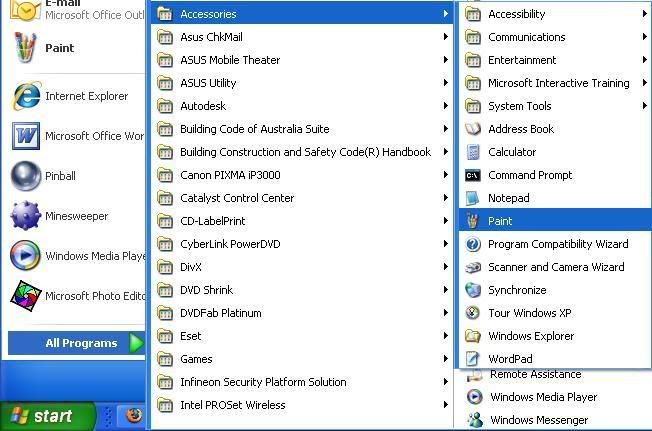
    Step 1: Open Paint


    Step 2: Copy the Image
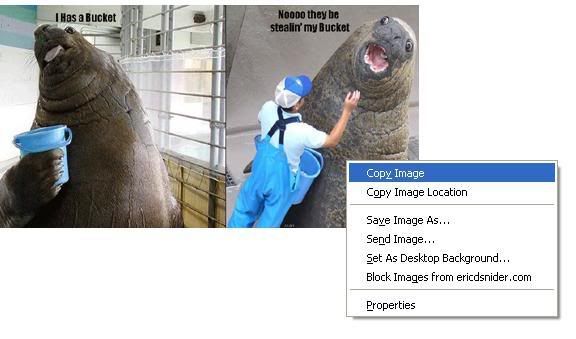

    Then Paste it like the picture shown below


    Step 3: Click Image, then Attributes
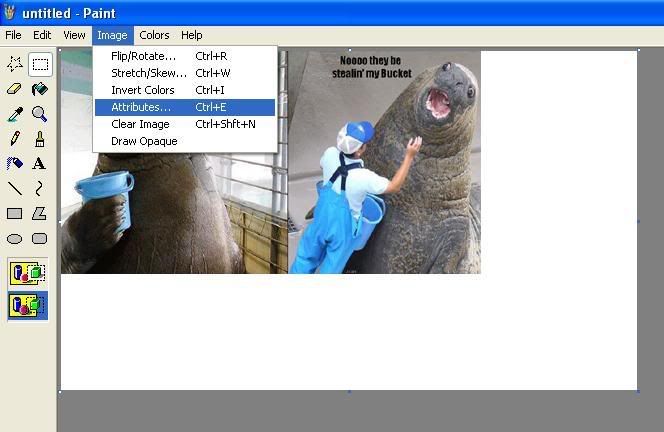


    Step 4: Resize to how many pixels you want BUT Maximum Amount is 960 pixels by 200 pixels
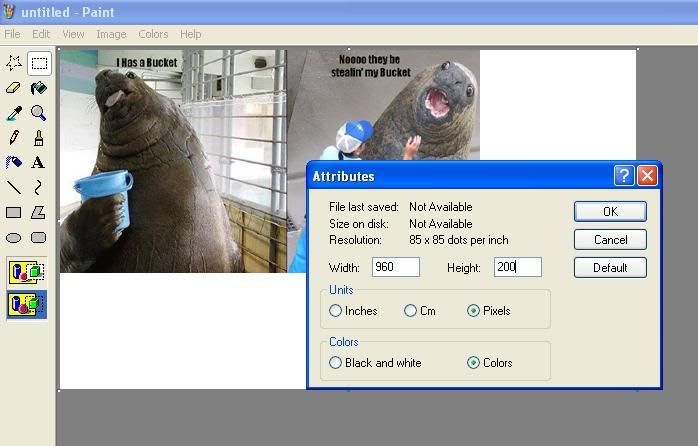


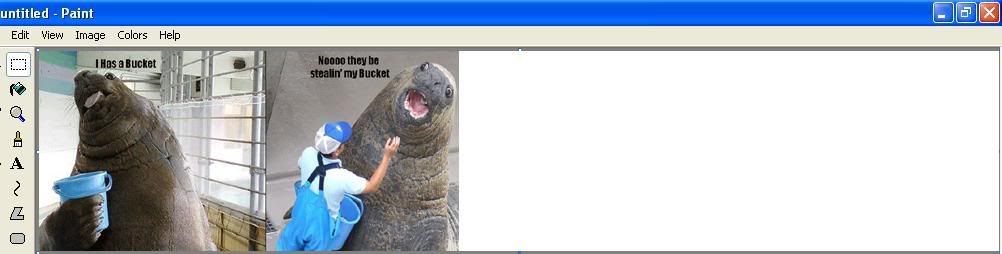
    Step 5: It should come out like this, but mine is not edited yet. You can edit it and add more pictures or do whatever you want. Just Be Creative !

    Click >>><<<Click

    Avg Rank: 174 AAA: 40% FC: 99%
    nev670 & SnS ^_^ !
    This video is Dedicated to Tasselfoot
    Jason Key's Best Friend
  • JKPolk
    tool
    • Aug 2003
    • 3737

    #2
    Re: How to Resize Images For Banners (With Pictures)

    If you don't use paint you can get cleaner results with every transformation.

    Comment

    • dean_machine
      FFR Veteran
      • Oct 2006
      • 1267

      #3
      Re: How to Resize Images For Banners (With Pictures)

      The actual banner width now is 942. If it's any wider, it will be resized to 942. If the height is going to be 200, it's better to have the width start out as 942 because when the banner is wider and gets shrunk, the height of the banner will shrink too. For example 960x200 will shrink to 942x196.
      Last edited by dean_machine; 04-22-2008, 05:53 PM. Reason: typo

      Comment

      • nev670
        FFR Veteran
        • Aug 2007
        • 452

        #4
        Re: How to Resize Images For Banners (With Pictures)

        hmm. . .
        Last edited by nev670; 04-28-2008, 02:42 PM.
        Click >>><<<Click

        Avg Rank: 174 AAA: 40% FC: 99%
        nev670 & SnS ^_^ !
        This video is Dedicated to Tasselfoot
        Jason Key's Best Friend

        Comment

        • nev670
          FFR Veteran
          • Aug 2007
          • 452

          #5
          Re: How to Resize Images For Banners (With Pictures)

          but on the profile editor it still says 960x200, that's weird . . . .
          Click >>><<<Click

          Avg Rank: 174 AAA: 40% FC: 99%
          nev670 & SnS ^_^ !
          This video is Dedicated to Tasselfoot
          Jason Key's Best Friend

          Comment

          • dean_machine
            FFR Veteran
            • Oct 2006
            • 1267

            #6
            Re: How to Resize Images For Banners (With Pictures)

            It actually should be mentioned in the style editor what the new max dimensions of the header image should be.

            Comment

            • Your Connection
              FFR Player
              • Jan 2007
              • 8

              #7
              Re: How to Resize Images For Banners (With Pictures)

              yeah well who needs bannarz when you gots blank pngs and l337 backgroundz... lawlz

              Comment

              • devonin
                Very Grave Indeed
                Event Staff
                FFR Simfile Author
                • Apr 2004
                • 10120

                #8
                Re: How to Resize Images For Banners (With Pictures)

                I'll also point out that when you just edit the "attributes" field, it just shrinks the outside box of the image, and pays no attention to the actual dimensions of the image itself (IE, when you changed the height of the image, the image wasn't compressed, the bottom was just cut right off of the frame)

                The sneaky trick is to make use of the "Stretch/Skew" option to actually change the physical size of the images, if you put it to say, 80%/80% of the original size, you'll make the overall image smaller, without losing any of the actual contents of the frame.

                Comment

                • dean_machine
                  FFR Veteran
                  • Oct 2006
                  • 1267

                  #9
                  Re: How to Resize Images For Banners (With Pictures)

                  Originally posted by Your Connection
                  yeah well who needs bannarz when you gots blank pngs and l337 backgroundz... lawlz
                  People who want more color on their profile because you're limited 512KB for the background file size, therefore you're limited on the amount of colors you can use. So with a banner, you can add more colorful graphics to your profile. Also, if it just so happens that it's possible for your profile page to be unbelievably long (maybe each of the comments on your own profile has an image attached that is 600px in height, plus the text the commenter leaves), the fake banner part of the huge background might tile down, which would most likely be an unwanted look.

                  A note about the walrus banner: that walrus picture might as well just be cropped to leave out the white on the side because the background would show behind it to the left and right of it if it were cropped, unless that is an unwanted look.

                  If the dimensions listed on the style editor don't get fixed to what they are now, then I think more people will be mislead to think that's the actual width the banner will take up in the profile.

                  Also I think it should be noted on the style editor that the background will have a width of 944px spread across the profile. It might be different if the banner is smaller than 942px wide (like maybe 943px wide for the background) because before if the banner was 959px or smaller in width, the background would be 961px wide instead of 962px.

                  Comment

                  • danny53x
                    AKA Yotipo
                    • Jan 2007
                    • 1008

                    #10
                    Re: How to Resize Images For Banners (With Pictures)

                    I use mspaint as lightweight software only for cropping.
                    If you want to resize, I suggest a program that will automatically smoothen your final image outcome.

                    Comment

                    Working...