

Ever wanted to change the annoying and boring menu music?!
Well i got bored and i wanted to find a way to put my own music as the background music when you start Stepmania...and guess what?! I FOUND IT! So then i thought i might help the whole world by showing them how to do it!
It's really simple, just follow these 3 steps.
1ST STEP.
-Download a .mp3 to .ogg converter, or if you have Audacity you can use it.
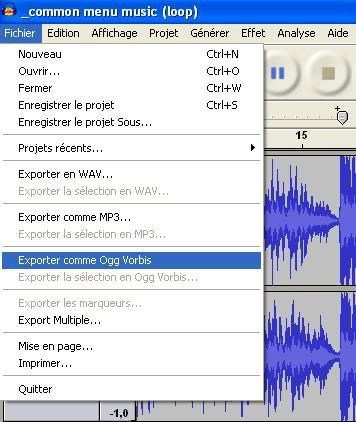
-Choose the song you want to put in the menu and convert it to a .ogg file. If you use Audacity, open the mp3 then export it as an OGG Vorbis
2ND STEP
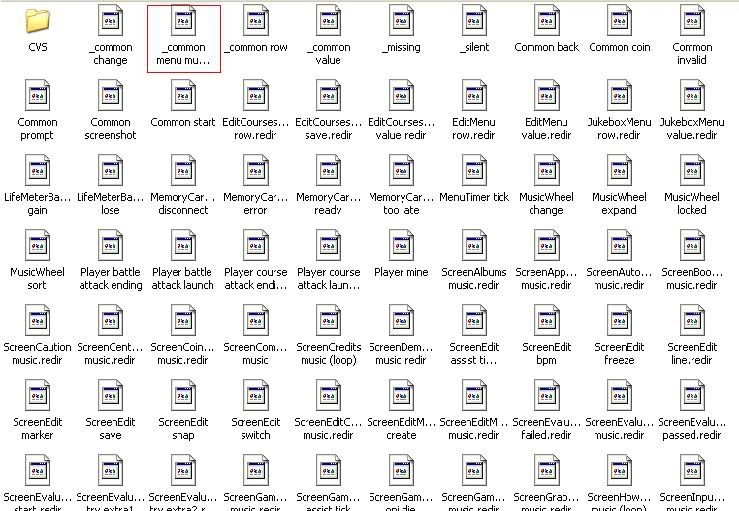
-Go to Program Files/StepMania/Themes/default/Sounds/. The second file: _common menu music (loop) is what we're looking for.
3RD STEP
-Rename your .ogg file for _common menu music (loop) and replace the original file by yours.
TADAAA!! It's as simple as this. I hope it'll be useful...
Thanks for reading!
Well i got bored and i wanted to find a way to put my own music as the background music when you start Stepmania...and guess what?! I FOUND IT! So then i thought i might help the whole world by showing them how to do it!
It's really simple, just follow these 3 steps.
1ST STEP.
-Download a .mp3 to .ogg converter, or if you have Audacity you can use it.
-Choose the song you want to put in the menu and convert it to a .ogg file. If you use Audacity, open the mp3 then export it as an OGG Vorbis
2ND STEP
-Go to Program Files/StepMania/Themes/default/Sounds/. The second file: _common menu music (loop) is what we're looking for.
3RD STEP
-Rename your .ogg file for _common menu music (loop) and replace the original file by yours.
TADAAA!! It's as simple as this. I hope it'll be useful...
Thanks for reading!