

This will be a complete guide on how to create a dream simfile for Stepmania. I will tell you everything you need to know. I will break it up into five sections, which will be broken up into sub-sections.
#1: Getting your song onto Stepmania.
#2: Figuring out BPM, and sync.
#3: Backgrounds, banners, cdtitles/icons.
#4: Putting videos into songs.
#5: Making a .lrc file.
============================================================================
============================================================================
#1: Getting your song onto Stepmania
Very simple, click on Stepmania Tools and Package Exporter, and hit the button that say Create song. Then find the song, and click Open. Ta-da!
=============================================================================
#2: Figuring out BPM, and sync
1: Beat 0 Offset (a.k.a. sync)
First off go into song options, and turn on assist tick, and autoplay. Then lower the music rate to 0.6x or less. Once you've done this, place a single note on a beat lines, and then play. Does the single arrow's clap go at the same time the first beat does? It probably won't. If it doesn't, you can use F11 and F12 to move the first beat along (F11 makes the first beat happen later, F12 makes it happen sooner), and hold down alt while pressing the F-keys for greater accuracy. Once you've got it spot on, you can either go back into song options and lower the rate to 0.3x, and spread (Ctrl + up/down) to make sure it's perfect, or you can save it and move on.
2: BPM (Beats Per Minute)
If the song has a nice, constant BPM through it, simply google search for Mixmeister and download it. Then put the song into Mixmeister, and it will tell you the BPM. In Stepmania use F7 and F8 to adjust the bpm to match what Mixmeister told you. (Again, hold alt for small increments) And to make sure, put 16 red arrows ahead of you and play the song to make sure it syncs up right. If Mixmeister fails to find the bpm, you can find it yourself by putting down several measures of red arrows, with assist tick on, and playing. If the claps fall behind the beat, the BPM is too low. If the claps go ahead of the beat, the BPM is too high. Adjust and re-play again and again to make sure you've got it, and if it goes off later on in the song just adjust it again. And if it just doesn't fit no matter how hard you try, your song may have a varying BPM, in which case you may want to try a helpful program called DDReam.
Great, you can proceed to step the song now, and I'm sure you know how to do that :P
============================================================================
Okay, those first two steps were mandatory, now we get to the extras...
#3:Backgrounds, banners, cdtitles/icons.
To do a background/banner/cdtitle simply put a picture in to the song folder.
1: Backgrounds
Let's say your song was called Quickening, you would lable the background Quickening-bg. Background images are supossed to be 640x480, but you can put an image of any size in the folder, and SM will automatically resize it to fit. Even if it was 480x640, but then it would be streched, and skewed.
2: Banners
Banners would go like this: Quickening-banner, and they should always be exactly 256x80. If you tried putting something like 280x58 it wouldn't work right.
3: cdtitles/icons
cdtitles go like this: SulferDragon-cdtitle, and you can make them any size, but I wouldn't recommend anything more then 110x75.
After you put a background, banner, or cdtitle into SM go play the song to make sure everything works right. If it doesn't go into edit/sync songs, and find the song, and then go into bg changes. Then scroll down to where it says Add Change to song Still, then exit the editer (don't save), and go play the song again and see. If you don't want to do that, or it still doesn't work after that go and reload songs/courses which is in options.
=============================================================================
4: Background videos
First off you'll want to downlaod DivX, VLC, and VirtualDub.
1: Editing
Instead of me explaining how to edit your video look here: http://d2rcr.cmcmoriginals.com/guide...aniavideos.txt
I know it says it's for Beatmania IIDX videos, but the same general ruled apply for a videos.
2: Taking pictures off of videos
Open VLC, stop the video where you want to take a picture, and go to Video > Snapshot.
3: Putting the video into Stepmania
Simply do what you did with the other graphics. To get the video running you have to go into the song editer, figure out what measure you want your movie to start at, and then go to Add Change to song Movie. Anything else is explained in that guide.
=============================================================================
=============================================================================
#5: Making LRC files
This step is very time consuming, and probably the most difficult. You will be rewarded though. This step is so large it really deserves it's own thread.
#1: Find the lyrics for the song your doing.
#2: Open notepad then place lyrics, via copy/paste.
#3: Add the proper timing for the lyrics to appear, and start scrolling at the bottom of the screen.
#4: Customizing.(optional)
#5: Saving, and running in Stepmania.
============================================================================
#1: Obviously if you don't know the lyrics you have to find them, and if you do know them you aren't going to want to type them all in by hand. If you're wanting song lyrics try the following sites.
For music from actual music groups. By which I mean stuff that's not from anime, or video games. Try the following websites:
http://www.songlyrics.com/

For anime lyrics I would suggest: http://www.animelyrics.com/anime/
For video game music I would try: http://www.chudahs-corner.com/
Remember that if you don't find what your looking for google is your best friend.
So now you have lyrics.
#2: This step is pretty brainless. Just go open notepad, located in Accessories in the start panel. Find the lyrics you're looking for, then copy/paste them into notepad. ta-da!
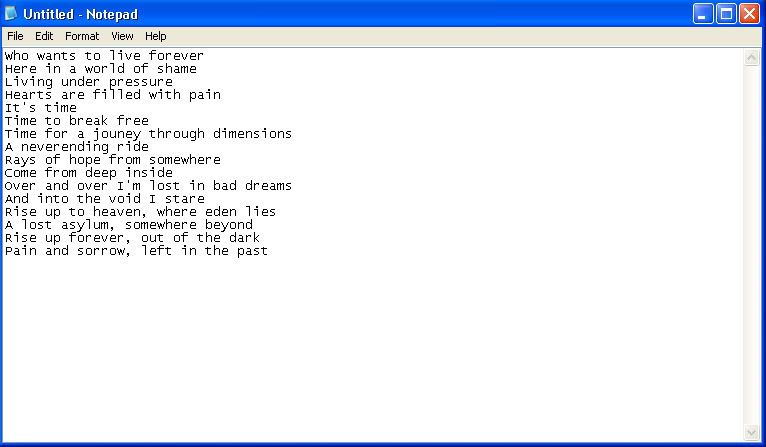
It looks like this.^^^ Right? Make sure the lyrics are nicely alligned, and no empty lines.
Ok, that's done, next step.
#3: This is where it gets tricky everyone, the most difficult step. What you need now is make it so the lyrics are displayed in sync with the lyrics in the song in Stepmania. To do this you must...
1: Play the song in Winamp, Windows Media Player, etc., and listen. For example, in my Freedom Call song shown above, the first line of lyrics starts at 0:46.17.
2: So, I know when it starts. Now I have to tell notpad, so I will do this:
[0:46.17]Who wants to live forever
See, I placed the second at which the lyrics will show up in brackets before the lyrics. So everything should look like this:
[0:46.17]Who wants to live forever
[0:48.42]Here in a world of shame
[0:51.09]Living under pressure
[0:54.11]Hearts are filled with pain
0:00.00 The first number(s) is the minute, the second numbers is the second, and the third numbers is the milliseconds.(one-hundredth of a second)
3: Also, by putting numbers on another line after the lyrics, let's say like this...
[0:54.11]Hearts are filled with pain
[0:57.00]
...will cause the lyrics to cut out. So, if I only wanted for it to show "Hearts are filled with pain" for one second I would do this:
[0:54.11]Hearts are filled with pain
[0:55.11]
Thus stoping the lyrics from showing.
So, I hope yours looks something like the one shown below.
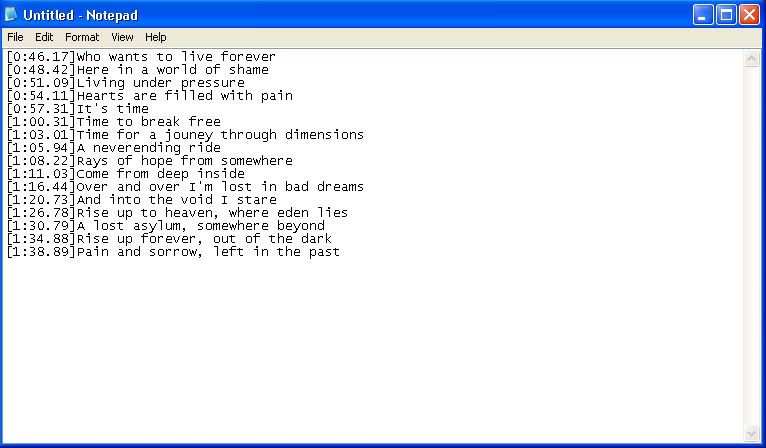
lol. I don't know if all the timings are correct on this, but they're all within a second. But for yours that won't do, make sure everything is within let's say, twenty centiseconds.
I hope you got all that, next step.
#4: Even though we don't have to anything else it's still nice to add a few more details to your .lrc file just to make it seem smoother.
Customizing help 1, creating two lines of lyrics, and delaying the lyrics so they don't light up as fast in Stepmania:
1: Two make it so it displays to lines of lyrics in Stepmania instead of the default one line simply add a pipe in between set lyrics, like this:
[1:26.78]Rise up to heaven,|where eden lies
Note not to put a space in between the pipe, and the lyrics.
Note that this next tip dosen't seem to work on all Stepmanias, it doesn't work on mine, but maybe it'll work for you. So you can give it a try, but I won't guarentee anything.
2: To delay how fast the lyrics light up in Stepmania simply add hypens between letters, and what not. Like this:
[1:26.78]Ri-se up to heaven,|whe-re e--den lies
You can also do this...
[1:26.78]Riise up to heaven,|wheere eeeden lies
...adding extra letters is supossed to delay the lyrics too, but it dosen't work for me.
I've also heard of people I using ../... instead of - to show the long hymn or most emphasize syllable sounds. I haven't tested it for myself though.
Customizing help 2, changing the color the lyrics are displayed in:
The default color the lyrics are displayed in is green, maybe you don't want that. Which means you'll have to do the following.
1: to do this you must use hexadecimal, which to tell the truth I don't understand, and can be rather confusing. So just mess around, you'll get it eventually.
To tell Stepmania to run the lyrics in your selected color you must do this on the line above the text you want to change the color of:
[COLOUR]0x0000FF
[0:46.17]Who wants to live forever
[0:48.42]Here in a world of shame
See what I added? The [COLOUR] in brackets, and then the hexadecimal code after it not in brackets above the lyrics. Now my lyrics will be displayed in this pretty blue color
Other examples colors you could use are:
FF0000
FF8844
FFFF00
00FF00
00FFFF
0000FF
FF00FF
And remember you can change the color as many times as you want. It's helpful if the song has more then one person singing. I can display one vocalist in green, and another in red.
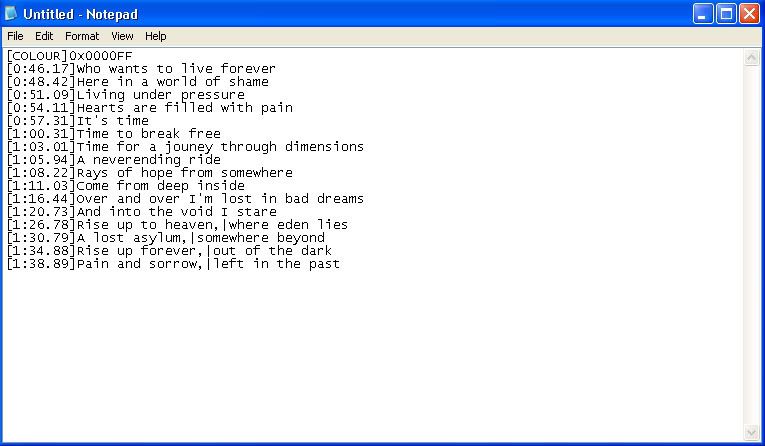
Here's what mine looks like now that I'm done.
Look at you, you're almost done. All you have to is save it.
#5: To save your file as .lrc simply go to Save As... select where you want the file to be saved, then type in [Insert song name].lrc, and hit the save button. Also, make sure you switch the Save As Type: to ALL FILES before you save.
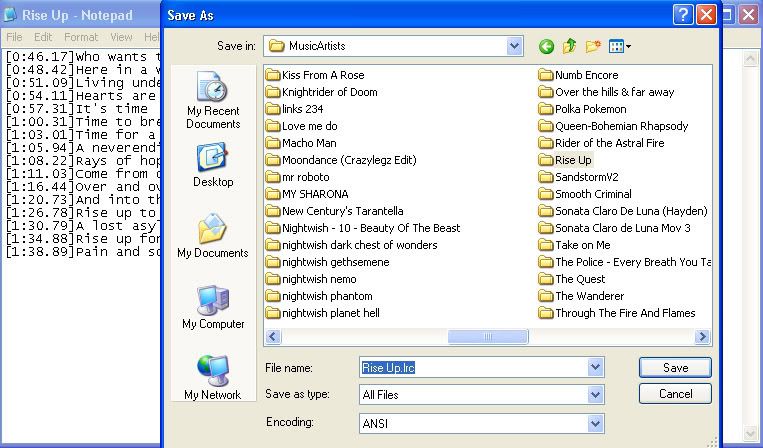
Make sure the song is in the appropriate folder then enter Stepmania, and play the song. Make sure you have the Display Lyrics option set to ON, and If your file still isn't working try Reloading Songs/Courses.
============================================================================
I hope I answered everybody's questions. If I missed anything important let me know, and I'll edit. If you have any questions just ask.
#1: Getting your song onto Stepmania.
#2: Figuring out BPM, and sync.
#3: Backgrounds, banners, cdtitles/icons.
#4: Putting videos into songs.
#5: Making a .lrc file.
============================================================================
============================================================================
#1: Getting your song onto Stepmania
Very simple, click on Stepmania Tools and Package Exporter, and hit the button that say Create song. Then find the song, and click Open. Ta-da!
=============================================================================
#2: Figuring out BPM, and sync
1: Beat 0 Offset (a.k.a. sync)
First off go into song options, and turn on assist tick, and autoplay. Then lower the music rate to 0.6x or less. Once you've done this, place a single note on a beat lines, and then play. Does the single arrow's clap go at the same time the first beat does? It probably won't. If it doesn't, you can use F11 and F12 to move the first beat along (F11 makes the first beat happen later, F12 makes it happen sooner), and hold down alt while pressing the F-keys for greater accuracy. Once you've got it spot on, you can either go back into song options and lower the rate to 0.3x, and spread (Ctrl + up/down) to make sure it's perfect, or you can save it and move on.
2: BPM (Beats Per Minute)
If the song has a nice, constant BPM through it, simply google search for Mixmeister and download it. Then put the song into Mixmeister, and it will tell you the BPM. In Stepmania use F7 and F8 to adjust the bpm to match what Mixmeister told you. (Again, hold alt for small increments) And to make sure, put 16 red arrows ahead of you and play the song to make sure it syncs up right. If Mixmeister fails to find the bpm, you can find it yourself by putting down several measures of red arrows, with assist tick on, and playing. If the claps fall behind the beat, the BPM is too low. If the claps go ahead of the beat, the BPM is too high. Adjust and re-play again and again to make sure you've got it, and if it goes off later on in the song just adjust it again. And if it just doesn't fit no matter how hard you try, your song may have a varying BPM, in which case you may want to try a helpful program called DDReam.
Great, you can proceed to step the song now, and I'm sure you know how to do that :P
============================================================================
Okay, those first two steps were mandatory, now we get to the extras...
#3:Backgrounds, banners, cdtitles/icons.
To do a background/banner/cdtitle simply put a picture in to the song folder.
1: Backgrounds
Let's say your song was called Quickening, you would lable the background Quickening-bg. Background images are supossed to be 640x480, but you can put an image of any size in the folder, and SM will automatically resize it to fit. Even if it was 480x640, but then it would be streched, and skewed.
2: Banners
Banners would go like this: Quickening-banner, and they should always be exactly 256x80. If you tried putting something like 280x58 it wouldn't work right.
3: cdtitles/icons
cdtitles go like this: SulferDragon-cdtitle, and you can make them any size, but I wouldn't recommend anything more then 110x75.
After you put a background, banner, or cdtitle into SM go play the song to make sure everything works right. If it doesn't go into edit/sync songs, and find the song, and then go into bg changes. Then scroll down to where it says Add Change to song Still, then exit the editer (don't save), and go play the song again and see. If you don't want to do that, or it still doesn't work after that go and reload songs/courses which is in options.
=============================================================================
4: Background videos
First off you'll want to downlaod DivX, VLC, and VirtualDub.
1: Editing
Instead of me explaining how to edit your video look here: http://d2rcr.cmcmoriginals.com/guide...aniavideos.txt
I know it says it's for Beatmania IIDX videos, but the same general ruled apply for a videos.
2: Taking pictures off of videos
Open VLC, stop the video where you want to take a picture, and go to Video > Snapshot.
3: Putting the video into Stepmania
Simply do what you did with the other graphics. To get the video running you have to go into the song editer, figure out what measure you want your movie to start at, and then go to Add Change to song Movie. Anything else is explained in that guide.
=============================================================================
=============================================================================
#5: Making LRC files
This step is very time consuming, and probably the most difficult. You will be rewarded though. This step is so large it really deserves it's own thread.
#1: Find the lyrics for the song your doing.
#2: Open notepad then place lyrics, via copy/paste.
#3: Add the proper timing for the lyrics to appear, and start scrolling at the bottom of the screen.
#4: Customizing.(optional)
#5: Saving, and running in Stepmania.
============================================================================
#1: Obviously if you don't know the lyrics you have to find them, and if you do know them you aren't going to want to type them all in by hand. If you're wanting song lyrics try the following sites.
For music from actual music groups. By which I mean stuff that's not from anime, or video games. Try the following websites:


http://www.songlyrics.com/
For anime lyrics I would suggest: http://www.animelyrics.com/anime/
For video game music I would try: http://www.chudahs-corner.com/
Remember that if you don't find what your looking for google is your best friend.
So now you have lyrics.
#2: This step is pretty brainless. Just go open notepad, located in Accessories in the start panel. Find the lyrics you're looking for, then copy/paste them into notepad. ta-da!
It looks like this.^^^ Right? Make sure the lyrics are nicely alligned, and no empty lines.
Ok, that's done, next step.
#3: This is where it gets tricky everyone, the most difficult step. What you need now is make it so the lyrics are displayed in sync with the lyrics in the song in Stepmania. To do this you must...
1: Play the song in Winamp, Windows Media Player, etc., and listen. For example, in my Freedom Call song shown above, the first line of lyrics starts at 0:46.17.
2: So, I know when it starts. Now I have to tell notpad, so I will do this:
[0:46.17]Who wants to live forever
See, I placed the second at which the lyrics will show up in brackets before the lyrics. So everything should look like this:
[0:46.17]Who wants to live forever
[0:48.42]Here in a world of shame
[0:51.09]Living under pressure
[0:54.11]Hearts are filled with pain
0:00.00 The first number(s) is the minute, the second numbers is the second, and the third numbers is the milliseconds.(one-hundredth of a second)
3: Also, by putting numbers on another line after the lyrics, let's say like this...
[0:54.11]Hearts are filled with pain
[0:57.00]
...will cause the lyrics to cut out. So, if I only wanted for it to show "Hearts are filled with pain" for one second I would do this:
[0:54.11]Hearts are filled with pain
[0:55.11]
Thus stoping the lyrics from showing.
So, I hope yours looks something like the one shown below.
lol. I don't know if all the timings are correct on this, but they're all within a second. But for yours that won't do, make sure everything is within let's say, twenty centiseconds.
I hope you got all that, next step.
#4: Even though we don't have to anything else it's still nice to add a few more details to your .lrc file just to make it seem smoother.
Customizing help 1, creating two lines of lyrics, and delaying the lyrics so they don't light up as fast in Stepmania:
1: Two make it so it displays to lines of lyrics in Stepmania instead of the default one line simply add a pipe in between set lyrics, like this:
[1:26.78]Rise up to heaven,|where eden lies
Note not to put a space in between the pipe, and the lyrics.
Note that this next tip dosen't seem to work on all Stepmanias, it doesn't work on mine, but maybe it'll work for you. So you can give it a try, but I won't guarentee anything.
2: To delay how fast the lyrics light up in Stepmania simply add hypens between letters, and what not. Like this:
[1:26.78]Ri-se up to heaven,|whe-re e--den lies
You can also do this...
[1:26.78]Riise up to heaven,|wheere eeeden lies
...adding extra letters is supossed to delay the lyrics too, but it dosen't work for me.
I've also heard of people I using ../... instead of - to show the long hymn or most emphasize syllable sounds. I haven't tested it for myself though.
Customizing help 2, changing the color the lyrics are displayed in:
The default color the lyrics are displayed in is green, maybe you don't want that. Which means you'll have to do the following.
1: to do this you must use hexadecimal, which to tell the truth I don't understand, and can be rather confusing. So just mess around, you'll get it eventually.
To tell Stepmania to run the lyrics in your selected color you must do this on the line above the text you want to change the color of:
[COLOUR]0x0000FF
[0:46.17]Who wants to live forever
[0:48.42]Here in a world of shame
See what I added? The [COLOUR] in brackets, and then the hexadecimal code after it not in brackets above the lyrics. Now my lyrics will be displayed in this pretty blue color
Other examples colors you could use are:
FF0000
FF8844
FFFF00
00FF00
00FFFF
0000FF
FF00FF
And remember you can change the color as many times as you want. It's helpful if the song has more then one person singing. I can display one vocalist in green, and another in red.
Here's what mine looks like now that I'm done.
Look at you, you're almost done. All you have to is save it.
#5: To save your file as .lrc simply go to Save As... select where you want the file to be saved, then type in [Insert song name].lrc, and hit the save button. Also, make sure you switch the Save As Type: to ALL FILES before you save.
Make sure the song is in the appropriate folder then enter Stepmania, and play the song. Make sure you have the Display Lyrics option set to ON, and If your file still isn't working try Reloading Songs/Courses.
============================================================================
I hope I answered everybody's questions. If I missed anything important let me know, and I'll edit. If you have any questions just ask.






Comment