View Full Version : How to add a header and background:
madmatt621
10-14-2007, 10:57 PM
Because I've been in the middle of conversations of people who can't figure out how to add their header or background to their profile, I was like "What the hell" and decided to make a thread dedicated to that.
Step 1: Open up the front page of FFR Forums and click on "User CP" on the banner towards the top of the page.

http://i220.photobucket.com/albums/dd299/madmatt621/probanner.jpg
Step 2: Under where it says "User CP" and "Options & Settings", click on "Your FFR Profile" and it'll take you to your profile.
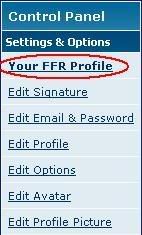
http://i220.photobucket.com/albums/dd299/madmatt621/probanner2.jpg
Step 3: After your profile loads, look to the top right of your profile and you should see where it says "All Profile/Default - Style Editor". Click on that and a window will open. Whether you are opening a header or a background, you will have to upload it and it will have to be a max size of 960 x 200 px. If you want to delete your header or background to put up a new one, check mark next to where it says "Delete Header" or "Delete Background".
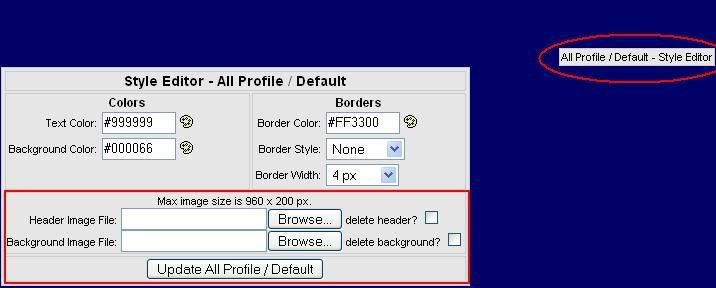
http://i220.photobucket.com/albums/dd299/madmatt621/probanner3.jpg
JasonKey
10-15-2007, 10:21 AM
good post .. thanks!
madmatt621
10-15-2007, 10:22 AM
Yea...Your welcome. I had to remake it because I posted it before, but I couldn't find it.
hoochan
01-22-2008, 05:35 PM
What's the size limit for backgrounds?
GamerShadow
01-22-2008, 06:28 PM
Mine is something around 900 by 2000, and it lets me have it. So I am assuming no height limit?
Summerschool
01-23-2008, 05:43 PM
No width/height limit, but it is automatically resized in proportion to max 900px X 200px. File size limit is 512KB.
ichigoxhero
01-24-2008, 11:08 AM
copy and paste a pic u like from inter net or were ever then save it into ur pics finally go to ffr ac and press browse on backround image file double click on the pic you want. if u have a color as a backround take the color off or u wont be able to see ur real backround:razz:
madmatt621
01-24-2008, 11:10 AM
copy and paste a pic u like from inter net or were ever then save it into ur pics finally go to ffr ac and press browse on backround image file double click on the pic you want. if u have a color as a backround take the color off or u wont be able to see ur real backround:razz:I did not know that.
[/sarcasm]
Work on your spelling and grammar.
danny53x
01-24-2008, 12:02 PM
Could I make a tutorial on how to take a part of a background and edit exactly 960x200 out of it for a banner in Photoshop?
EDIT: http://www.flashflashrevolution.com/vbz/showthread.php?p=2025593#post2025593
Misa_Amane
03-20-2008, 09:52 PM
took me forever & a day to figure out how to do this.
thx.
^^
knuckles2224
03-21-2008, 08:24 AM
Lol, forums are helpful ,also the chats as well.
branden-c
04-25-2008, 07:00 PM
Any one need a nice backround and banner :) i can make for free on my own time :) PM me
jose_negron
05-21-2008, 09:31 AM
Any one need a nice backround and banner :) i can make for free on my own time :) PM me
i need one for my background
OMG its HIM
05-21-2008, 08:27 PM
can i also added, bmp's not allowed on headers and backgrounds ;D
kashin_123
06-7-2008, 04:28 PM
i do
200273707gc
06-24-2008, 06:39 PM
hmm... i seem to not get a picture though..? nvm dont mind me
Stewie7Griffin
06-27-2008, 06:51 PM
i clicked user cp but i didnt see Your FFR Profile :\ actualy there wasnt even a Options and Settings
otaku_N64
07-11-2008, 04:18 AM
D: can`t find it! *sob*
Raveren
07-11-2008, 04:23 AM
For those of you who can't find the link after clicking CP, don't worry, those aren't necessary steps. Just go to your profile and start at step 3.
Cursebred
07-24-2008, 12:39 AM
What's the size limit for backgrounds?
I know avatar is 200 x 200. For others, I have no clue.
Kagami_Hiiragi
07-27-2008, 01:20 PM
and all this time i thought there was a limit to the background. jesus.
sapheroth40
09-24-2008, 06:27 PM
Thanks for the tips.
hsbryda
12-11-2008, 06:46 AM
I know avatar is 200 x 200. For others, I have no clue.
dude you rule
no_1_no3z
12-11-2008, 10:12 AM
yeah i have no idea what people are talking about but.........hi?
Nightfirecat
12-11-2008, 12:53 PM
If you don't know what people are talking about, then ask.
I know avatar is 200 x 200. For others, I have no clue.
The limit for signatures is around 500x300... I don't remember--it says in the signature editor in the user control panel.
The banner size limit says that it's 960x200, but it's actually 942x200. The background has a width limit of 942, but no height limit, but it does have a size limit of 512kb, so it's usually a .jpg file.
Abused
12-12-2008, 10:37 AM
Thanks For The Tips
dean_machine
12-12-2008, 12:11 PM
Avatars and Signatures: please keep your signature to a maximum width of 500 pixels, and a maximum height of 250 pixels. Avatars must be no more than 200 pixels in height, and no more than 175 pixels in width.
This is what the forum rules has to say about avatars and signatures. The signature size is a please, but the avatar size is a must.
BlackTigerLilly582
12-27-2008, 08:35 PM
My bg won't go through. It keeps saying "Background-Failed to upload" Help!!!
Syhto
12-27-2008, 08:42 PM
My bg won't go through. It keeps saying "Background-Failed to upload" Help!!!
The backgrounds have been down for everyone for some time. All we have left to do is wait for the error to be repaired.
chica17
03-31-2009, 08:36 AM
hey i need help gettin a background.... i dnt knw how to get a background would u help me ????
All_That_Chaz
03-31-2009, 01:27 PM
Please don't double-post. You can find backgrounds anywhere. Google image search what kind of background you want, download it, then upload it onto your profile.
evanniel14
04-25-2009, 03:06 AM
u can see at d upper right side d SHOW STYLE EDITOR
den after clicking it
go again to o d upper right side and click DEFAULT/BANNER/BACKGROUnD - Style editor
den do wat u want
hope i can help
http://www.pokeplushies.com/images/adoptables/1266795.gif
Click here to feed me! (http://www.pokeplushies.com/feed/1266795)
Darkbreezee
09-19-2009, 03:35 PM
yepp guess everythin got said already , but well somethin important at the end , besides the max. size , u should keep in mind that the maxmim amount of KBs is 512 KB ,so do not create a bigger one than allowed ^.~
.Seminole
10-27-2010, 11:52 PM
where do u go to make a cool header?
All_That_Chaz
10-28-2010, 12:57 AM
where do u go to make a cool header?
You make the images yourself or download them from the internet. Once you have the images you want, you can add them in the style editor as per the first post in this thread.
XKiNGXkILLaX
12-9-2010, 11:48 AM
Ask me, I will create a banner/Background for you if you want, its easy to make one and put one up.
TC_Halogen
12-9-2010, 12:52 PM
While this thread has been bumped - those of you who are new to making backgrounds might benefit from some of these tips:
- If you're having trouble finding good, generic stock images (abstract, grunge, etc), there are sites like this one (http://sxc.hu) that can help you. There's some good quality images in there if you know to look.
- Image editors are your best friend. Photoshop and GIMP are probably the most preferable.
- When making your profile, if you want to customize everything all at once, do all of your editing within your background. Some common sizes for the profile background are 960 x (a multiple of 1250). Once you're finished with it, make a 960x200 transparent image (or just use this (http://debit13.site40.net/stuff/banner.png) one). This allows for your entire background to be seen, rather than having the top 200 pixels be cut off.
- Be patient; creating a good background takes a lot of practice and will occupy a ton of your time.
Revenue
01-24-2011, 01:36 AM
Hey guys Revenue here
I was just wondering if there were any talented people out there if they wanted to design me a Backround and possible a Header
If you can please PM me and we can talk about it
Thanks! :)
emo1555
01-27-2011, 07:59 AM
yepp guess everythin got said already , but well somethin important at the end , besides the max. size , u should keep in mind that the maxmim amount of KBs is 512 KB ,so do not create a bigger one than allowed ^.~
hey can some1 please help me make a banner that said best friends....and had a pic of the twins from death note please i really would appreciate it.
All_That_Chaz
01-27-2011, 01:11 PM
Hey guys Revenue here
I was just wondering if there were any talented people out there if they wanted to design me a Backround and possible a Header
If you can please PM me and we can talk about it
Thanks! :)
hey can some1 please help me make a banner that said best friends....and had a pic of the twins from death note please i really would appreciate it.
Please make all requests for backgrounds, headers, etc. in the 32-Bit RGB forum (http://www.flashflashrevolution.com/vbz/forumdisplay.php?f=32).
emo1555
01-29-2011, 11:58 AM
how do i put a background on my profile i dont remember how????
All_That_Chaz
01-29-2011, 12:24 PM
how do i put a background on my profile i dont remember how????
It's outlined in the first post of this thread.
HammyMcSquirrel
01-30-2011, 07:19 PM
Updated thread on this information has been made. You can find it here (http://www.flashflashrevolution.com/vbz/showthread.php?t=117236).
vBulletin® v3.8.1, Copyright ©2000-2013, Jelsoft Enterprises Ltd.
